Every website, app and online service you use can see your IP address – and with it, your internet provider and approximate location. If you want to hide your IP address for privacy, security on public WiFi or simply to stop being tracked across sites, there are several ways to do it. This guide compares them honestly, explains which one fits your situation, and shows you how to check that it worked.
What your IP address reveals
Start by looking at your own IP on our What Is My IP page. Anyone your device connects to can see the same information:
- Your internet provider – for example your cable, fiber or mobile operator.
- Your approximate location – usually your city or region.
- A stable identifier – advertisers and data brokers combine your IP with cookies to follow you across websites.
Your IP does not reveal your name or exact address on its own, but it is a key piece of the puzzle used for tracking and profiling.
Why hide your IP address?
- Privacy: reduce how much websites and advertisers can track and link your activity.
- Public WiFi security: on hotel, café or airport networks, encryption protects your traffic from others on the same network.
- Less exposure: gamers and streamers hide their home IP to avoid targeted attacks.
- Travel: keep using your usual online services while abroad.
Hiding your IP is legal in most countries. It is never a license for illegal activity – the law still applies online.
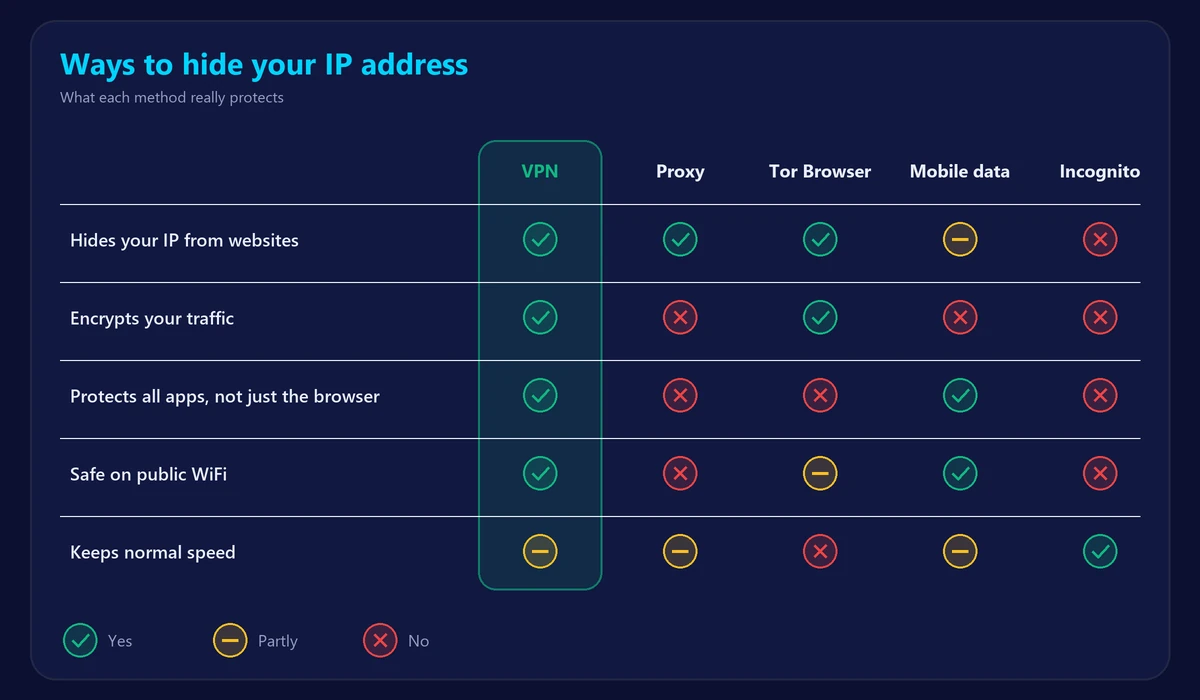
5 ways to hide your IP address
| Method | Hides your IP | Encrypts traffic | Speed | Best for |
|---|---|---|---|---|
| VPN | Yes, for all apps | Yes | Small slowdown | Everyday privacy and public WiFi |
| Proxy server | Usually only in the browser | Often no | Varies | Quick, single-site use |
| Tor Browser | Yes, in the Tor Browser | Yes, inside the Tor network | Much slower | Maximum anonymity |
| Mobile data | Changes it, doesn’t hide it | No | Depends on signal | A different IP in seconds |
| Incognito mode | No | No | Normal | Not saving history on your device |
1. Use a VPN (best overall)
A VPN (virtual private network) sends all of your internet traffic through an encrypted tunnel to a VPN server. Websites see the server’s IP address instead of yours, and nobody on your local network – including public WiFi – can read your traffic. It works for every app on your device, not just the browser, and good VPNs add only a small amount of latency.
The trade-offs: a quality VPN is a paid service, and connecting to a distant server adds some delay – which is why gamers should pick a server close to them.
2. Use a proxy server
A proxy forwards your browser’s requests through another server, so websites see the proxy’s IP. Many web proxies are free, but most don’t encrypt your traffic, only cover the browser, and free ones may log or inject ads into what you browse. Use them only for quick, non-sensitive tasks.
3. Use the Tor Browser
Tor routes your traffic through three volunteer-run servers, making it very hard to trace back to you. It is free and excellent for anonymity, but it is much slower than a normal connection, some websites block it, and it only protects traffic inside the Tor Browser.
4. Switch to mobile data
Turning off WiFi and using mobile data gives you a different IP address, usually shared with many other customers of your mobile operator. It doesn’t hide your activity from your operator and offers no encryption, but it is a quick way to change your IP.
5. Why incognito mode doesn’t work
Private or incognito browsing only stops your browser from saving history and cookies on your device. Your IP address is still fully visible to every website and to your internet provider.
How to hide your IP address with a VPN
- Choose a VPN provider with apps for all your devices and a clear no-logs policy.
- Install the app on your phone, computer or tablet and sign in.
- Connect to a server – for the best speed, pick one in or near your own country.
- Check that it worked: open our What Is My IP page. The IP address, provider and location should now be the VPN’s, not yours.
- Test your speed: run our speed test with and without the VPN to see the difference on your connection.
Does hiding your IP slow down your internet?
A little. Encryption and the extra trip to the VPN server usually reduce speed slightly and add some latency. On a fast connection with a nearby server, most people don’t notice it for browsing and streaming. For competitive gaming, check your ping with and without the VPN and keep it off if it makes a noticeable difference.
Frequently asked questions
Is it legal to hide my IP address?
In most countries, yes – VPNs and proxies are widely used by businesses and individuals. Some countries restrict VPNs, so check local rules when traveling. Illegal activities remain illegal whether your IP is hidden or not.
Can my internet provider see what I do if I use a VPN?
Your provider can see that you are connected to a VPN and how much data you use, but not which websites you visit or what you do on them.
Is a free VPN good enough?
Some free VPNs are fine for occasional use, but many limit speed and data, or make money from your data. For daily privacy, a reputable paid VPN is the safer choice.
Will hiding my IP make me completely anonymous?
No. Websites can still identify you through accounts you log into, cookies and browser fingerprinting. Hiding your IP is one important layer of privacy, not total anonymity.