Your internet works perfectly in the morning, then every evening Netflix starts buffering, games lag and video calls freeze. You’re not imagining it: slow internet at night is one of the most common connection problems, and it almost always has a clear cause. This guide explains why it happens and, more importantly, how to fix it.
The short answer
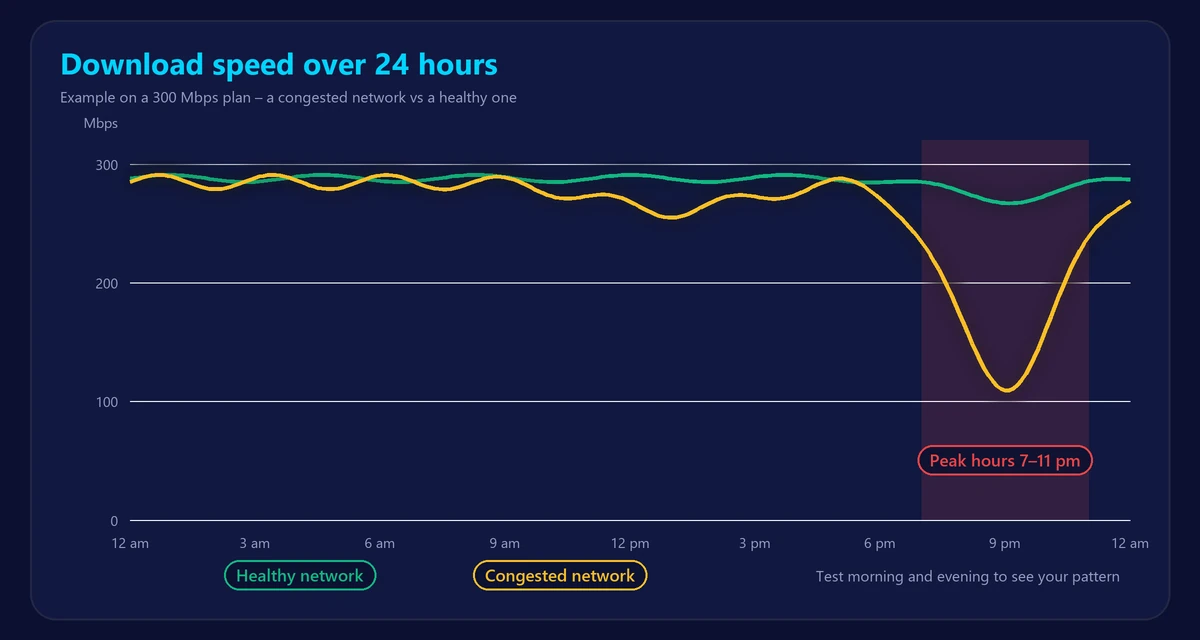
Between roughly 7 pm and 11 pm, everyone is home and online at the same time. Your provider’s network, your neighbors’ WiFi and the devices in your own home are all busier than at any other time of day. If any of those links has little spare capacity, your speed drops. The good news: most of the causes below can be confirmed in a few minutes and fixed or worked around.
1. Network congestion at your provider
Internet connections are shared at some point. On cable internet, a whole street or neighborhood shares the same segment of the network. Fixed wireless, 5G home internet and satellite services share the capacity of a tower or a satellite beam. Even fiber networks share equipment further upstream.
Providers size their networks for typical peak usage, but in some areas demand grows faster than upgrades. The result is evening congestion: speeds that are fine at 10 am but drop by 30–70% at 9 pm. Congestion usually also increases ping and jitter, which is why online games feel laggy at the same time.
2. Your own home network is busier
In the evening, your household competes with itself. Two 4K streams, a game download, a video call and a phone backing up photos can easily use 100 Mbps or more. If your plan is 100 Mbps, everything slows down together. Use our internet speed calculator to check whether your plan is big enough for everyone’s peak-time use.
3. WiFi interference from neighbors
Your WiFi shares the airwaves with every router nearby. In apartments and dense neighborhoods, dozens of networks overlap, especially on the crowded 2.4 GHz band. In the evening, all of those networks are active, so interference and retransmissions increase and your WiFi speed falls – even if your provider’s line is perfectly fine.
4. Background updates and backups
Game consoles, PCs, phones and smart TVs often schedule updates and cloud backups for the evening or night. A single console update can be 50–100 GB and will happily use all of your bandwidth. If the slowdown starts at a precise time every day, an automatic update or backup is a likely suspect.
5. Busy servers on the other end
Sometimes the problem isn’t your connection at all. Popular streaming platforms, game servers and websites are also under maximum load in the evening, and some are slower to respond. If only one service is slow while speed tests look normal, the bottleneck is probably on their side.
6. Traffic management and data caps
Some plans include traffic management. Wireless home internet and satellite plans may be deprioritized during busy periods, and some plans slow you down after you pass a monthly data threshold. Check your plan’s fair-use or network-management terms if speeds drop drastically at the same time every night.
7. An overheating or overloaded router
Routers have small processors and limited memory. After days of uptime and with many devices connected, older models can slow down, drop connections or overheat, especially in enclosed cabinets. A router that works better right after a restart is a sign of this problem.
How to find out what’s really slowing you down
Don’t guess – measure. A few tests at the right moments tell you exactly where the problem is.
- Test in the morning and in the evening. Run our free speed test at a quiet time (for example 10 am) and again at peak time (around 9 pm). Write down download, upload and ping each time.
- Test on a cable. Repeat the evening test with a computer connected to the router by Ethernet. If wired speed is fine but WiFi is slow, your WiFi is the problem, not your provider.
- Pause everything else. Run one more test with all other devices paused. If speed jumps back up, your own household is using the bandwidth.
- Check ping and jitter. Our ping test shows whether latency and packet loss rise in the evening – a classic sign of provider congestion.
- Repeat for several days. One slow evening can be a fluke; the same drop every night is a pattern you can report.
| What you see | Most likely cause |
|---|---|
| Wired speed is fine, WiFi is slow at night | WiFi interference or weak coverage |
| Wired and WiFi both slow, ping rises at night | Congestion at your provider |
| Speed returns when other devices are paused | Your home uses more than your plan |
| Slowdown starts at the exact same time daily | Scheduled updates or backups, or traffic management |
| Speed tests are fine, one service is slow | That service’s servers are busy |
How to fix slow internet at night
Fix WiFi problems
- Use the 5 GHz or 6 GHz band for devices near the router – they are far less crowded than 2.4 GHz.
- Set the router to choose its WiFi channel automatically, or pick a less busy channel manually. You can change it in your router settings (see our router login guide).
- Move the router to a central, open spot, or add a mesh system if some rooms always have a weak signal. Our guide to mesh WiFi vs extenders explains which one you need.
- Connect TVs, consoles and work computers by Ethernet whenever possible.
Manage your home’s bandwidth
- Schedule console, PC and phone updates for the early morning.
- Turn on QoS (Quality of Service) in your router and prioritize video calls or gaming.
- Lower streaming quality on secondary screens – a TV in the kitchen doesn’t need 4K.
Deal with provider congestion
- Restart your router and modem to rule out equipment issues.
- Contact your provider with dated test results from several evenings, ideally on a wired connection. Evidence makes it much more likely they’ll investigate the line or the local network.
- Ask whether a newer modem or router, or a different plan, is available at your address.
- If the problem continues for weeks, consider switching technology – fiber is generally the least affected by evening congestion.
Frequently asked questions
Is it normal for internet to be slower at night?
A small drop of 10–20% at peak time can be normal on shared networks. Losing half your speed or more every evening is not, and is worth reporting to your provider.
Can a VPN fix slow internet at night?
Usually not – a VPN adds overhead. It only helps in the rare case where a provider slows down specific services; if the VPN makes those services faster, that’s a sign of traffic management.
Does restarting the router really help?
It clears memory, reconnects to the network and can move to a less crowded WiFi channel. It won’t fix provider congestion, but it fixes a surprising number of evening slowdowns caused by the router itself.
Will a faster plan fix it?
Only if the bottleneck is your own household’s usage. If the problem is congestion on the provider’s network or weak WiFi, a faster plan on the same network often won’t help. Test first, then decide – our guide to good internet speeds can help you choose.