Free WiFi at the airport, a café or your hotel is convenient – but is public WiFi safe? The honest answer: it’s much safer than it was ten years ago, because most websites now use encryption, but real risks remain. This guide explains what can actually go wrong on public networks and the simple habits that keep your data protected.
The short answer
Public WiFi is generally safe for everyday browsing of secure websites (those starting with https://). The risks come from fake hotspots, apps and sites that don’t encrypt data, and other people on the same network trying to reach your device. With a few precautions – and ideally a VPN – you can use public WiFi with confidence.
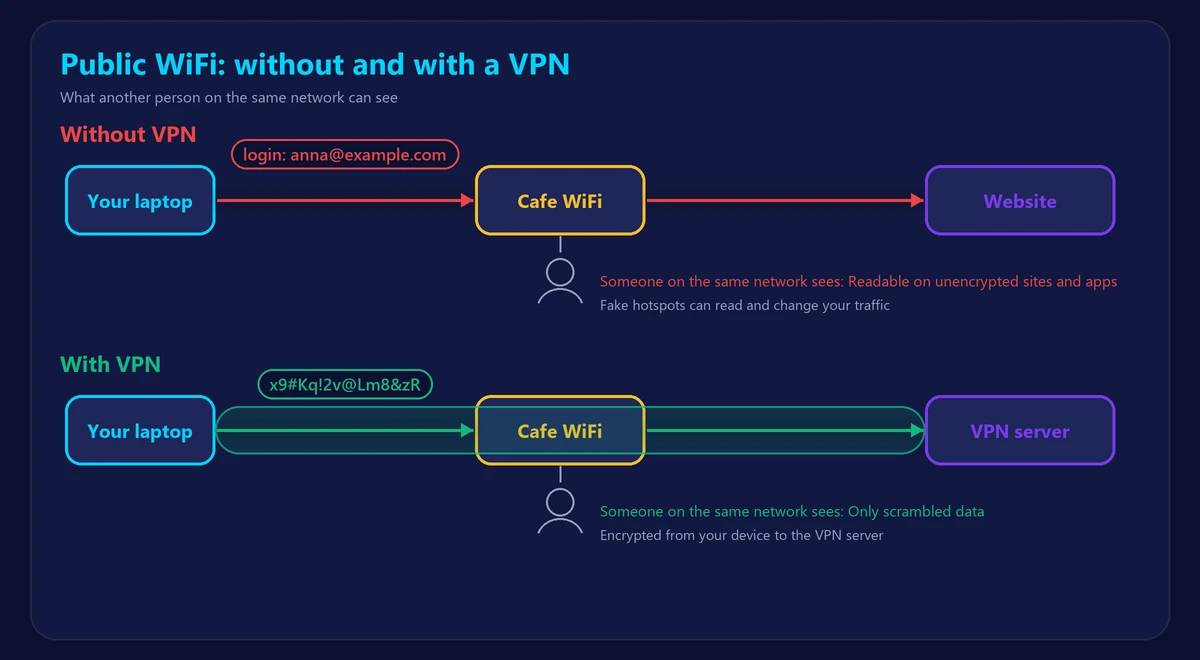
The real risks of public WiFi
1. Fake hotspots (“evil twins”)
An attacker can create a network with a convincing name like “Airport_Free_WiFi” or “Starbucks Guest”. Once you connect, everything you send passes through their device. They may show fake login pages to collect your passwords.
2. Unencrypted traffic
Most websites use HTTPS, but some older sites, apps and smart devices still send data without encryption. On an open network, that data can be read by anyone nearby with the right tools.
3. Snooping on the same network
Other users on the network can see which devices are connected and may try to access shared folders, printers or devices with weak security settings.
4. Captive portals and data collection
The login page you accept before getting online often asks for your email or phone number. Some networks log the sites you visit and use the data for marketing.
5. Malware through fake updates
A compromised network can show pop-ups asking you to “update” your browser or install software. Legitimate updates never come from a WiFi login page.
How to stay safe on public WiFi
- Confirm the network name with staff before connecting, and avoid networks with odd or duplicate names.
- Only use HTTPS websites – look for the padlock in your browser, and never enter passwords on a site that shows a security warning.
- Turn off file sharing and set the network as “Public” on Windows, so your device isn’t visible to others.
- Disable auto-connect to open networks on your phone and laptop.
- Use two-factor authentication on important accounts, so a stolen password alone isn’t enough.
- Avoid banking and sensitive tasks on public networks – or use mobile data instead.
- Keep your device updated, but only through your device’s settings, never through a pop-up.
- Use a VPN, which encrypts everything your device sends, even on fake or unsecured networks.
- Forget the network when you leave, so your device doesn’t reconnect automatically later.
Why a VPN is the strongest protection
HTTPS protects individual websites, but a VPN encrypts all of your device’s traffic – every app, every website, every background service – before it leaves your device. Even if you join a fake hotspot, the attacker only sees scrambled data going to the VPN server. A VPN also hides your real IP address from the websites you visit. Learn more in our guide on how to hide your IP address.
Is hotel WiFi safe?
Hotel networks are often shared by hundreds of guests and protected by a password printed on a card – which means anyone staying there knows it. Treat hotel WiFi exactly like any other public network. If your room has an Ethernet port, it isn’t automatically safer; the same precautions apply.
Is public WiFi slow?
Often, yes. Public networks are shared by many people and may limit each user’s speed. You can measure it with our speed test – and if video calls stutter, check your ping and jitter too.
Frequently asked questions
Can someone hack my phone through public WiFi?
It’s uncommon for a fully updated phone, but fake hotspots and unencrypted apps can expose your data. Keeping your phone updated and using a VPN removes most of the risk.
Is password-protected WiFi safe?
A shared password stops strangers outside the café, but everyone inside who knows the password can still be on the same network. It’s safer than an open network, not private.
Is incognito mode enough on public WiFi?
No. Incognito mode only avoids saving history on your device; it doesn’t encrypt anything or hide your traffic from the network.
Is mobile data safer than public WiFi?
Generally yes. Your connection to the mobile network is encrypted and not shared with strangers nearby, which makes it a good option for banking and sensitive tasks.