Modem, router, gateway – internet providers use these words as if everyone knows the difference. But when your internet stops working or you want to replace a rented box, it really helps to understand modem vs router: what each device does, whether you need both, and when a 2-in-1 gateway makes sense. This guide explains it in plain English.
The short answer
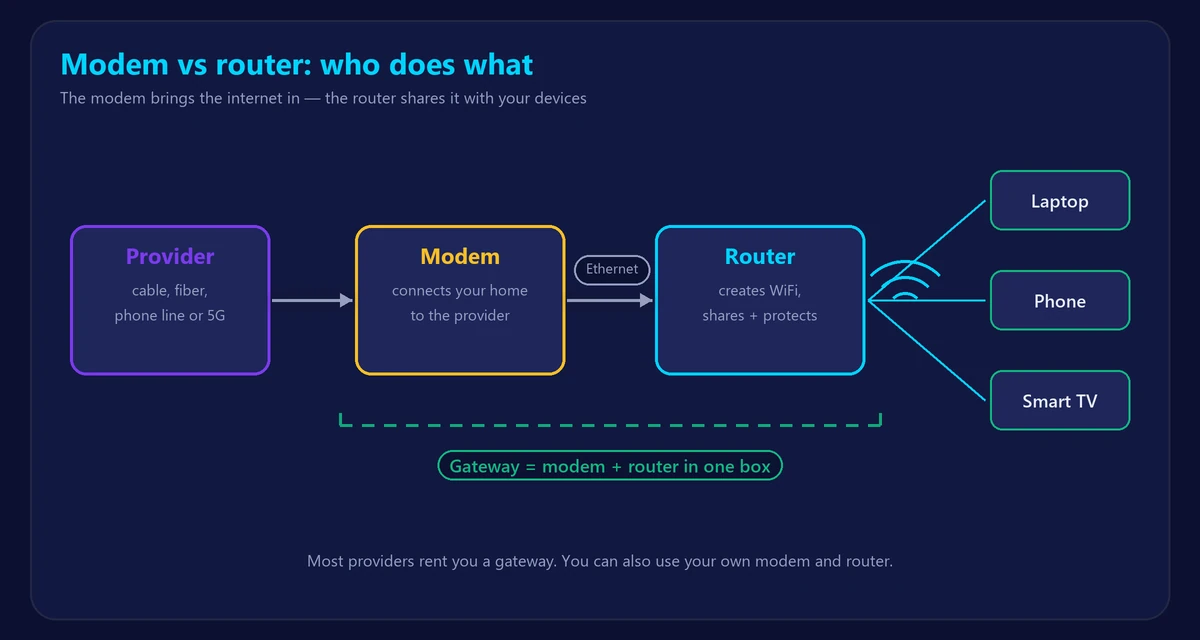
- The modem connects your home to your internet provider. It translates the signal coming over the cable, phone line, fiber or cellular network into internet your devices can use.
- The router creates your home network. It shares that one internet connection with all your devices, over WiFi and Ethernet cables, and protects them with a firewall.
- A gateway is a single box that contains both a modem and a router. Most providers rent you one of these.
Think of the modem as the front door to the internet and the router as the hallway that leads to every room in your home.
What does a modem do?
“Modem” comes from modulator–demodulator. Its job is to talk to your provider’s network using the right technology:
| Connection type | Modem used |
|---|---|
| Cable (Xfinity, Spectrum, Cox…) | DOCSIS cable modem, connected to the coax wall outlet |
| DSL | DSL modem, connected to the phone line |
| Fiber | ONT (optical network terminal), connected to the fiber line |
| 5G / fixed wireless home internet | 5G gateway with a built-in cellular modem |
A modem on its own usually gives internet to one device through one Ethernet port. It does not create WiFi.
What does a router do?
- Creates your WiFi network (name and password) and provides Ethernet ports.
- Shares one internet connection with dozens of devices by giving each a local IP address.
- Protects your network with a firewall and lets you control settings like parental controls, guest WiFi and QoS.
- Lets devices talk to each other – printers, smart TVs, game consoles and phones on the same network.
You change router settings by logging in at an address like 192.168.1.1 – see our router login guide.
Modem vs router at a glance
| Modem | Router | |
|---|---|---|
| Main job | Brings internet into your home | Shares internet with your devices |
| Connects to | Provider’s line (coax, phone, fiber, cellular) | The modem |
| Creates WiFi? | No | Yes |
| Public IP address | Receives it from the provider | Gives private IPs to devices |
| Typical lights | Power, Downstream/Upstream (DS/US), Online | Power, Internet/WAN, WiFi, Ethernet ports |
Do you need both a modem and a router?
To have WiFi at home, you need both functions – but not necessarily two separate boxes:
- Gateway (2-in-1): simplest setup, one box, one power plug. Most provider equipment works this way.
- Separate modem + router: more flexibility. You can upgrade the router to WiFi 6/7 or a mesh system without touching the modem.
- Fiber: the ONT acts as the modem; you still need a router (often included by the provider).
You can technically plug one computer directly into a modem without a router, but then you get no WiFi, no firewall from a router and only one connected device.
Gateway or separate devices – which is better?
| Gateway (2-in-1) | Separate modem + router |
|---|---|
| ✔ Easy setup, one box | ✔ Upgrade WiFi without replacing the modem |
| ✔ Provider supports it fully | ✔ Often better WiFi coverage and features |
| ✘ Rental fees can add up every month | ✔ Buying your own can save rental fees |
| ✘ Fewer settings and slower updates on some models | ✘ Two boxes, slightly more setup |
If your WiFi is weak in some rooms, upgrading the router (or adding a mesh system) usually helps more than changing the modem – see mesh WiFi vs extender and WiFi 6 vs 6E vs 7.
How to tell if the problem is the modem or the router
- Connect a laptop to the router with a cable and run our speed test. If it’s fast wired but slow on WiFi, the router or WiFi is the issue.
- Look at the modem lights. A blinking or red Online/DS/US light usually means a problem with the line or provider.
- Restart both: modem first, then the router. Our guide explains how to restart or reset your router correctly.
Frequently asked questions
Is a router the same as a modem?
No. The modem connects to your provider; the router creates your home network. A gateway combines both in one box.
Does a router need a modem?
Yes, to reach the internet a router needs a modem (or ONT) in front of it – unless the router has a built-in modem, like a gateway or 5G router.
Can I use my own modem and router?
Usually yes. Cable providers publish lists of approved modems; your own router works with almost any provider. Check your provider’s compatibility list before buying.
Does a better router make internet faster?
It can’t exceed your plan’s speed, but a better router often delivers much more of that speed over WiFi, especially farther from the router.