WiFi is convenient, but is it as fast as plugging in a cable? For browsing on your phone, the difference hardly matters. For gaming, video calls, 4K streaming and fast internet plans, it can be huge. This guide compares Ethernet and WiFi on speed, latency and reliability, and helps you decide which devices deserve a cable.
The short answer
- Ethernet is faster, more stable and has lower, steadier ping. It’s the best choice for gaming consoles, desktop PCs, smart TVs and work computers.
- WiFi is good enough for phones, tablets, laptops on the move and most everyday tasks – especially with a modern router.
- On fast plans (500 Mbps and above), WiFi is often the bottleneck. A cable lets you actually use the speed you pay for.
Ethernet vs WiFi at a glance
| Ethernet | WiFi | |
|---|---|---|
| Typical real speed | Full plan speed, up to the port limit (1 Gbps or more) | Often 30–70% of plan speed, depending on distance and walls |
| Latency (ping) | Lowest, very stable | A few ms higher, with occasional spikes |
| Jitter and packet loss | Minimal | Higher with interference |
| Affected by walls and neighbors | No | Yes |
| Mobility | Fixed | Anywhere in range |
| Security | Requires physical access | Depends on WPA2/WPA3 and a strong password |
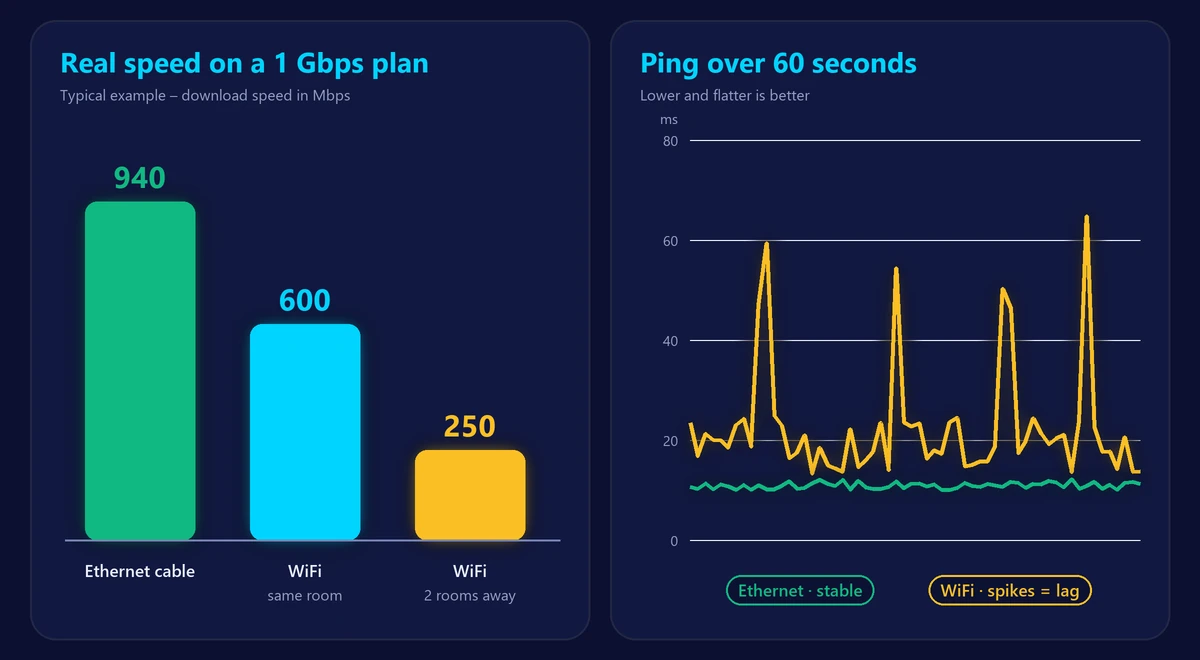
Speed: how much faster is Ethernet?
A wired connection delivers almost exactly what your plan and your network port allow. A standard gigabit Ethernet port carries up to about 940 Mbps of real data; 2.5 Gbps and 10 Gbps ports go much further.
WiFi speed, on the other hand, drops with distance, walls, floors and interference. Next to a modern router, a recent phone or laptop can reach several hundred Mbps or more. Two rooms away, it may get a fraction of that. Run our speed test next to the router on WiFi, then again on a cable – the gap shows how much WiFi is costing you.
Latency and stability: why gamers use cables
For gaming and video calls, consistency matters more than raw speed. WiFi shares the airwaves with every other device and network nearby, so data sometimes has to be resent. That causes small, irregular delays – jitter – and occasional lost packets, which feel like lag, rubber-banding or robotic voices.
Ethernet avoids all of that. Ping is typically a few milliseconds lower, and, more importantly, it stays flat. Compare both with our ping test: if WiFi shows jitter above 10 ms or any packet loss while the cable doesn’t, wire your gaming device.
Which devices should use Ethernet?
- Gaming consoles and gaming PCs – lower, steadier ping and much faster game downloads.
- Smart TVs and streaming boxes – smooth 4K without buffering, and less load on your WiFi.
- Work computers – reliable video calls and fast uploads (see what counts as a good upload speed).
- Mesh nodes – a wired backhaul gives every node near-full speed (see mesh WiFi vs extenders).
- Network storage and desktop PCs that never move.
Every device you move to a cable also frees up WiFi capacity for phones and laptops.
Which Ethernet cable do you need?
| Category | Maximum speed | Use it for |
|---|---|---|
| Cat5e | 1 Gbps (up to 100 m) | Plans up to 1 Gbps |
| Cat6 | 1 Gbps (10 Gbps up to about 55 m) | Most homes, future multi-gig |
| Cat6a | 10 Gbps (up to 100 m) | Multi-gig plans and long runs |
For most homes, Cat6 is the sweet spot: affordable and ready for faster plans. Check that both your router and your device have ports that match your plan – a 2 Gbps plan needs 2.5 Gbps ports to be used fully.
Can’t run a cable? Alternatives
- Powerline adapters send the network through your electrical wiring. Easy to set up, but speed depends on your wiring.
- MoCA adapters use coaxial TV cables and are typically faster and more stable than powerline.
- Flat Ethernet cables slide under carpets and along baseboards.
- A better WiFi setup – a modern router or mesh system closes much of the gap. Read how to boost your WiFi signal and our guide to WiFi 6, 6E and 7.
Frequently asked questions
Is Ethernet always faster than WiFi?
In real homes, almost always. In ideal conditions – a WiFi 7 device right next to a WiFi 7 router – WiFi can match or even exceed a 1 Gbps Ethernet port, but that advantage disappears quickly with distance and walls.
Does Ethernet reduce ping?
Yes, usually by a few milliseconds, and it removes most jitter and packet loss. The improvement in stability is often more noticeable than the lower number itself.
Why is my Ethernet speed capped at around 100 Mbps?
Your device or cable is probably limited to Fast Ethernet. Check that the network port supports 1 Gbps and replace very old or damaged cables with Cat5e or Cat6.
Can I use Ethernet and WiFi at the same time?
Yes. Most devices automatically prefer the wired connection when a cable is plugged in, and fall back to WiFi when it’s removed.