Internet ads shout about download speed, but upload speed is what decides whether your video calls look sharp, your cloud backups finish overnight and your live stream doesn’t stutter. If you work from home, create content or share a connection with a busy household, upload speed matters more than you might think. Here’s what counts as a good upload speed – and how to get one.
The short answer
- 10 Mbps is the minimum for comfortable video calls and everyday use for one or two people.
- 20–50 Mbps is good for most families and anyone working from home.
- 100 Mbps or more is ideal for content creators, live streamers, large households and anyone who uploads big files often.
For reference, the FCC in the United States currently uses 20 Mbps upload (with 100 Mbps download) as its benchmark for broadband.
What upload speed is used for
Every time you send data from your home to the internet, you use upload bandwidth:
- Video calls – your camera and microphone stream continuously to the other participants.
- Cloud backups and sync – photos, documents and phone backups going to iCloud, Google Drive, OneDrive or Dropbox.
- Sending files – email attachments, sharing videos, uploading to work servers.
- Live streaming – broadcasting on Twitch, YouTube or social media.
- Online gaming – small amounts of data, but they must arrive quickly and steadily.
- Security cameras – cloud cameras upload video around the clock.
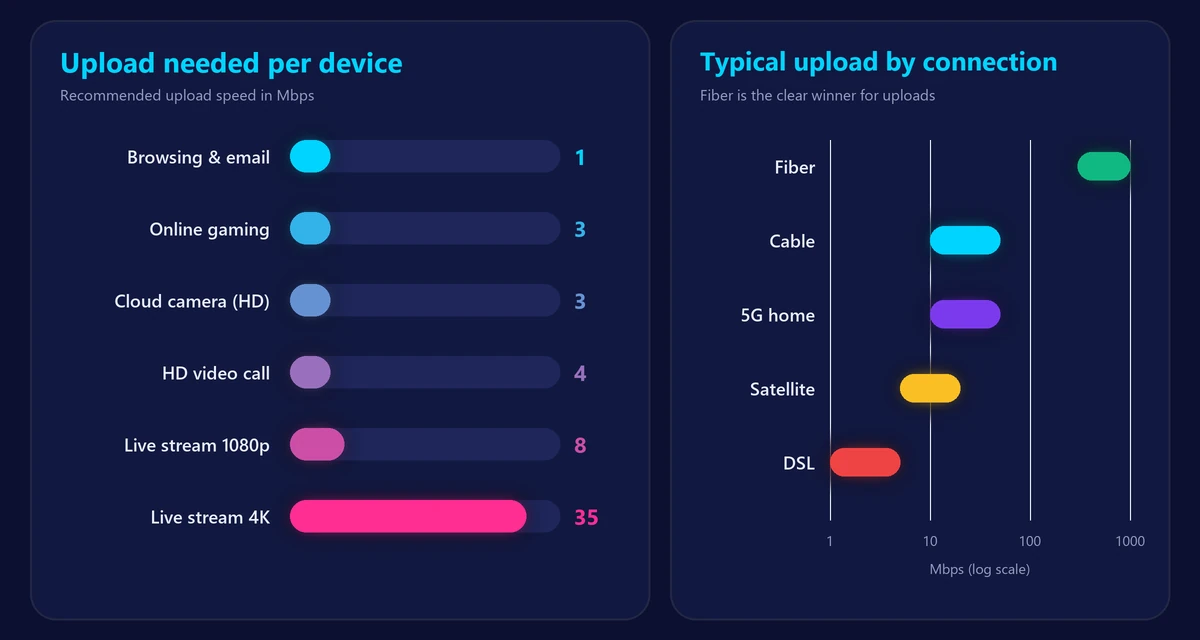
Upload speed needed by activity
| Activity | Recommended upload per device |
|---|---|
| Browsing, email, social media | 1 Mbps |
| HD video call (Zoom, Teams, FaceTime) | 3–4 Mbps |
| Online gaming | 2–5 Mbps |
| Cloud security camera (HD) | 2–4 Mbps |
| Live streaming in 1080p | 6–10 Mbps |
| Live streaming in 4K | 20–50 Mbps |
| Large uploads (videos, backups) | As much as possible |
Remember to add these up for everyone using the connection at the same time. Two people on video calls while a camera uploads and a phone backs up photos can easily need 15–20 Mbps. Our internet speed calculator does the math for upload and download together.
How long do uploads take?
| File | Size | 10 Mbps | 50 Mbps | 500 Mbps |
|---|---|---|---|---|
| 100 photos | 500 MB | about 7 min | about 1 min 20 s | about 8 s |
| 10-minute 4K video | 4 GB | about 55 min | about 11 min | about 1 min |
| Full phone backup | 50 GB | about 11 h | about 2 h 15 min | about 14 min |
This is where low upload speed really hurts: a first backup that takes all night on a slow connection finishes in minutes on fiber. (If you’re unsure about the units, see our guide to Mbps vs MB/s.)
Why is my upload so much slower than my download?
Most connections are asymmetric by design. Providers give more capacity to downloads, because most households download far more than they upload.
| Connection type | Typical upload |
|---|---|
| Fiber | Often the same as download (symmetrical), 300 Mbps–several Gbps |
| Cable | Usually 10–50 Mbps, higher in upgraded areas |
| 5G home internet | Roughly 10–50 Mbps, depending on signal |
| Satellite | Roughly 5–20 Mbps |
| DSL | Often below 5 Mbps |
If upload speed is important to you, fiber is by far the best option. Check our provider pages – for example AT&T, Verizon or Xfinity – to see typical upload speeds by technology.
How to test your upload speed
- Connect your computer to the router with an Ethernet cable if possible.
- Pause backups, cloud sync and video calls on all devices – they use upload bandwidth in the background.
- Run our free speed test. It measures download, upload, ping and jitter in about 30 seconds.
- Compare the upload result with the upload speed listed in your plan, not the download speed.
How to improve your upload speed
- Stop background uploads during calls: pause cloud sync and schedule backups for the night.
- Use Ethernet for your work computer or streaming PC – WiFi affects upload just as much as download.
- Improve your WiFi with a better router position or mesh system. See how to boost your WiFi signal.
- Enable QoS on your router and prioritize video calls.
- Restart your router and modem if upload drops suddenly.
- Upgrade your plan or technology – a fiber plan is the only way to get very high upload speeds.
Frequently asked questions
Is 10 Mbps upload good?
It’s enough for one or two people making video calls and doing everyday tasks. It becomes tight with several simultaneous calls, cloud backups or live streaming.
Is 20 Mbps upload good for streaming on Twitch?
Yes. 1080p streaming typically needs 6–10 Mbps, so 20 Mbps leaves room for the rest of your household.
Does upload speed affect gaming?
Games use very little upload bandwidth, but if someone else saturates the upload (with a backup, for example), your ping can spike. Check it with our ping test.
Why does my upload speed change so much?
Background uploads, WiFi interference and network congestion all affect it. Test at different times on a wired connection to get a reliable picture.