Multi-gig fiber plans are spreading, and 2 Gig is often the first step up from gigabit. But is 2 gig internet worth it? For most homes, probably not yet. A single device rarely gets more than about 1 Gbps unless your router, cables and device all support faster speeds. It starts to make sense for large households, frequent huge transfers and homes that already have the right equipment. Here’s how to decide.
What is 2 gig internet?
2 Gig means up to 2,000 Mbps, or twice the speed of a 1 Gig plan. It’s mostly offered on fiber, often with matching upload speed. At full speed, a 100 GB game takes about 7 minutes, compared with about 13 minutes on 1 Gig.
The catch: your equipment must keep up
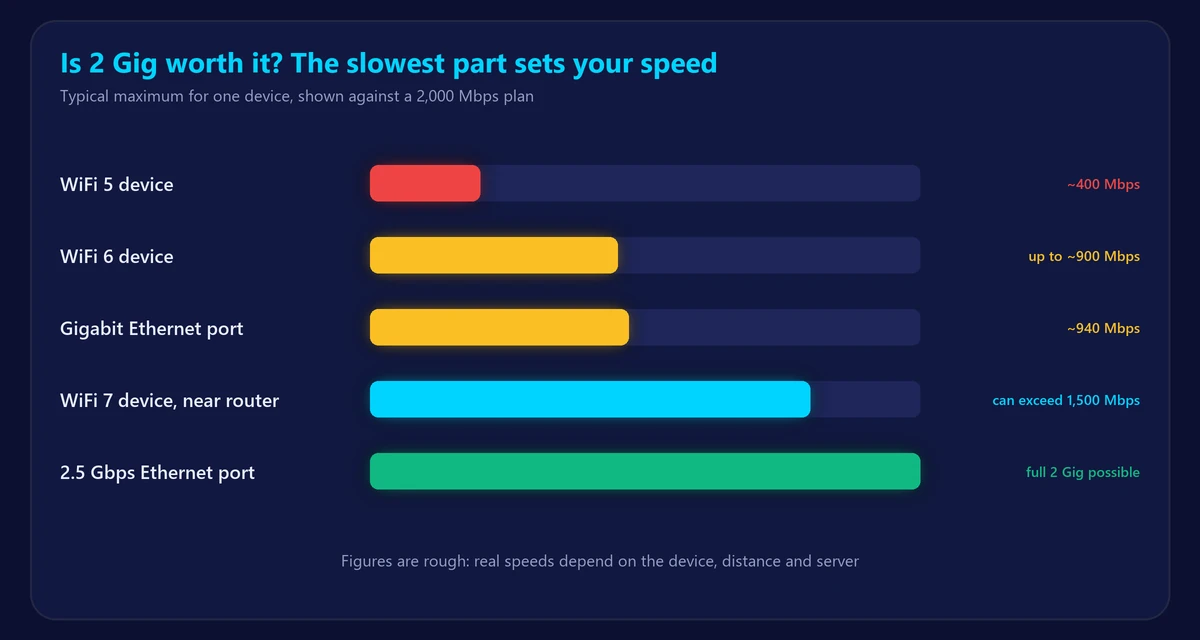
Your speed is limited by the slowest part of the connection. Standard gigabit Ethernet tops out around 940 Mbps, so it can’t deliver 2 Gig to one device.
| Part | What you need for 2 Gig |
|---|---|
| Router | A WAN port of 2.5 Gbps or faster |
| Computer | A 2.5 Gbps or faster Ethernet port or adapter |
| Cable | Cat 5e or better for 2.5 Gbps; Cat 6A for 10 Gbps |
| Switch | Multi-gig ports, if you use one |
| WiFi | WiFi 6E or WiFi 7 devices, close to the router, for the best wireless speeds |
Many providers include a suitable router, so check the model. Compare WiFi generations in WiFi 6 vs 6E vs 7.
When 2 gig internet is worth it
- Many heavy users at once: several people downloading games, uploading video and streaming at the same time.
- Frequent large transfers: video editors, content creators and people who back up terabytes to the cloud, if the other end is fast enough.
- A small price gap: if the plan costs little more than 1 Gig and includes a capable router.
- You already own multi-gig equipment.
When it isn’t worth it
- Your home mostly streams, browses, games and joins video calls. None of that needs anything close to 2 Gig.
- Most of your devices use WiFi 5 or older.
- You’d need to buy a new router, adapters and switches just to use it.
- You’re trying to fix weak WiFi, which a faster plan won’t solve.
Also, many servers won’t send data to you at 2 Gbps, so even a fully capable setup won’t reach full speed on every download.
Is 2 gig good for gaming?
It won’t improve your ping noticeably. Games use only a few Mbps, so you’d only gain faster downloads. If you want smoother play, see how to lower ping.
1 Gig vs 2 Gig at a glance
| 1 Gig | 2 Gig | |
|---|---|---|
| Maximum speed | 1,000 Mbps | 2,000 Mbps |
| 100 GB download, best case | About 13 minutes | About 7 minutes |
| Needs multi-gig equipment | No | Yes, to get full speed on one device |
| Best for | Almost every home | Large households and big transfers |
Still deciding between lower tiers? Read 500 Mbps vs 1 Gig, or estimate what you need with our speed calculator.
How to test a 2 Gig connection
- Connect a computer to a multi-gig router port with a good cable.
- Check that the link speed shows 2.5 Gbps or higher.
- Pause other devices and run our speed test.
- Remember that a single test may not reach full speed, even on a working line. Repeat it at different times.
Frequently asked questions
Do I need 2 gig internet?
Most homes don’t. 300 Mbps to 1 Gig is plenty unless you have many heavy users or transfer huge files often.
How fast is 2 gig internet?
Up to 2,000 Mbps, or about 250 MB per second, in the best case.
Why does my 2 Gig plan show about 940 Mbps?
Your device or router is probably connected through a gigabit port. Use multi-gig ports on both ends.
Will 2 gig make WiFi faster?
Only if your router and devices are already limited by your plan. If the signal is weak, the plan won’t change that.