Providers often offer two tempting tiers side by side: 500 Mbps and 1 Gig. The gigabit plan sounds twice as good – but will you actually notice the difference? In this 500 Mbps vs 1 Gig comparison we look at what each speed really delivers, how many Mbps 1 Gig is, why many people never see gigabit speeds over WiFi, and who should pay for the upgrade.
How many Mbps is 1 Gig?
1 Gig (1 Gbps) equals 1,000 Mbps. So a gigabit plan is exactly twice as fast as a 500 Mbps plan on paper. In practice, a standard 1 Gbps Ethernet port tops out around 940 Mbps because some capacity is used by network overhead – that’s why speed tests on gigabit plans rarely show a full 1,000.
500 Mbps vs 1 Gig at a glance
| 500 Mbps | 1 Gig (1,000 Mbps) | |
|---|---|---|
| 4K streams at once (on paper) | About 20 | About 40 |
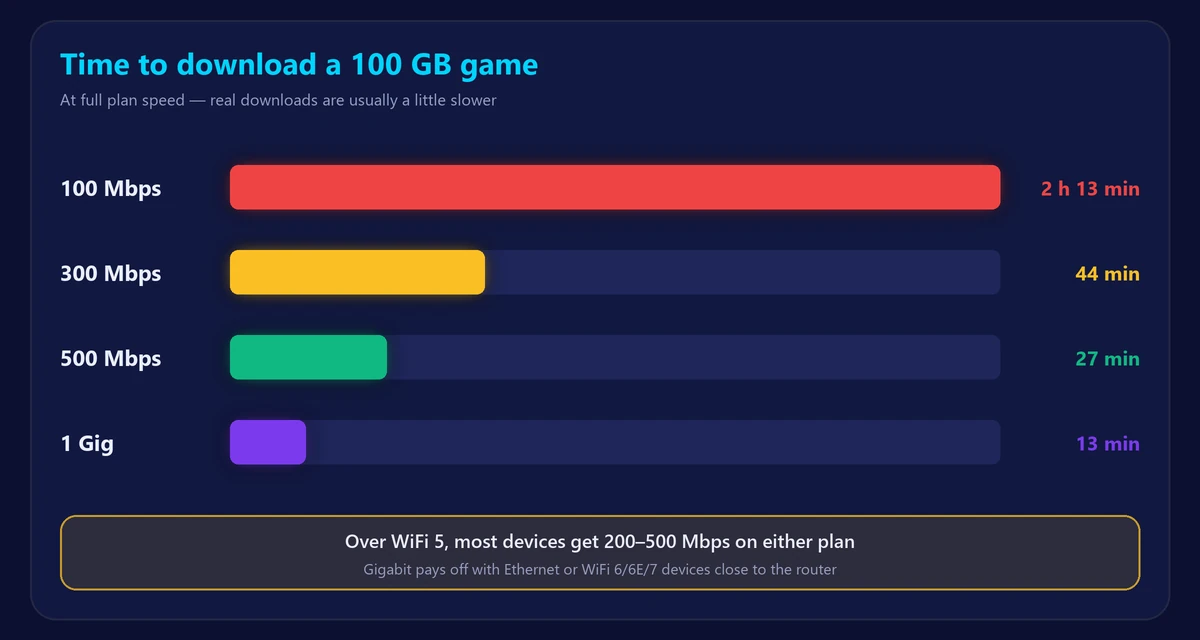
| 100 GB game download | About 27 minutes | About 13 minutes |
| 1 GB file | About 16 seconds | About 8 seconds |
| Typical speed over WiFi 5 | 200–450 Mbps | 250–500 Mbps |
| Typical speed over WiFi 6/7, near router | Close to 500 Mbps | 500–900 Mbps |
| Best for | Most households of 2–6 people | Large households, power users, big daily downloads |
Will you notice the difference?
For everyday activities, usually no. Streaming, browsing, video calls and online gaming all use far less than 500 Mbps. A web page doesn’t load twice as fast on gigabit, because page loading depends mostly on latency, not bandwidth.
You will notice the difference when:
- You download very large files – games, 4K video projects, backups – and the server is fast enough to send them at full speed.
- Many people in the home use heavy bandwidth at the same time.
- You have wired devices or modern WiFi 6/6E/7 devices that can actually receive more than 500 Mbps.
The WiFi bottleneck
This is the most important point in the 500 Mbps vs 1 Gig decision. A gigabit plan only helps if your home network can carry it:
- Older phones and laptops (WiFi 5) often reach only 200–500 Mbps in real use.
- Distance and walls cut WiFi speed sharply, even on the newest routers.
- Your router must support gigabit speeds – many provider routers older than a few years do not over WiFi.
To see what your devices can really use, run our speed test on WiFi and then with an Ethernet cable. Learn more in Ethernet vs WiFi and WiFi 6 vs 6E vs 7.
Is 1 Gig internet worth it?
Gigabit is worth it if:
- You have 5 or more heavy users, or several gamers and streamers.
- You regularly download or upload huge files (gaming, video editing, large cloud backups).
- The price difference is small – some providers charge only $10–20 more.
- It’s a fiber plan with fast upload as well, which helps creators and remote workers.
Stick with 500 Mbps if:
- Your household has 1–4 people with normal streaming, gaming and work use.
- Most of your devices use WiFi 5 or are far from the router.
- The gigabit plan costs significantly more.
Our internet speed calculator can help you decide based on your household. For a closer look at each tier, read is 500 Mbps fast? and is 100 Mbps fast?
What about 2 Gig and faster plans?
Multi-gig plans (2, 5 or even 8 Gbps) are appearing on fiber networks. To benefit, you need a router and devices with 2.5 Gbps or faster ports, plus WiFi 7 for wireless speeds above 1 Gbps. For almost every home today, these plans are about future-proofing rather than a noticeable improvement.
Frequently asked questions
Is 1 Gig internet fast?
Yes, very. 1,000 Mbps is ten times the FCC’s 100 Mbps broadband benchmark.
Is 500 Mbps vs 1 Gig noticeable for gaming?
Not during play – games use only a few Mbps. Gigabit only shortens download times. Ping matters far more; check it with our ping test.
Why does my gigabit plan show only 300–600 Mbps?
Almost always because of WiFi or an older device. Test with an Ethernet cable connected to a gigabit port to see your real line speed.
Do I need a new router for 1 Gig?
Often yes. Look for a WiFi 6 or newer router with gigabit (or faster) ports. A mesh system helps in larger homes – see mesh WiFi vs extender.