Does your internet slow down only on Netflix or YouTube, or right after you’ve used a lot of data? You might be asking: is my ISP throttling my internet? Throttling is when a provider deliberately slows some or all of your traffic. It does happen, but plain congestion and WiFi problems are far more common. This guide shows how to tell the difference with simple tests you can run at home.
What is ISP throttling?
Throttling is a deliberate speed limit applied by your internet provider. The usual forms are:
- Data cap throttling: speeds drop after you pass a monthly allowance. This is common on mobile, hotspot, satellite and some home plans.
- Congestion management: during busy periods, some plans get lower priority (often called deprioritization).
- Service-based throttling: certain kinds of traffic, such as video streaming, are limited.
In the U.S., federal net neutrality rules were struck down by a court in January 2025, so what providers may do depends largely on state law and their own policies. Most providers publish a “network management” disclosure explaining their practices. It’s worth reading yours.
Throttling or just slow internet?
| What you see | More likely |
|---|---|
| Speed drops sharply late in your billing cycle, then returns | Data cap throttling |
| One service is slow; everything else is fine | Possible service throttling, or a problem with that service |
| Everything is slow every evening | Congestion |
| Slow on WiFi, fast on a cable | Your WiFi, not throttling |
| Speed is capped at a suspiciously round number | A plan limit or a cable/port limit |
How to test if your ISP is throttling you
1. Get a clean baseline
Plug a computer into the router with an Ethernet cable, pause other devices and run our speed test. Compare the result with your plan. If it’s slow only on WiFi, follow how to fix slow WiFi instead.
2. Test at different times
Run the test in the morning and again between 8 and 10 pm for a few days. A regular evening drop usually points to congestion – see why internet is slow at night.
3. Check your data usage
Log in to your provider’s account or app. If the slowdown started when you passed your allowance, you’ve probably found the cause. Your bill or plan details should state the limit.
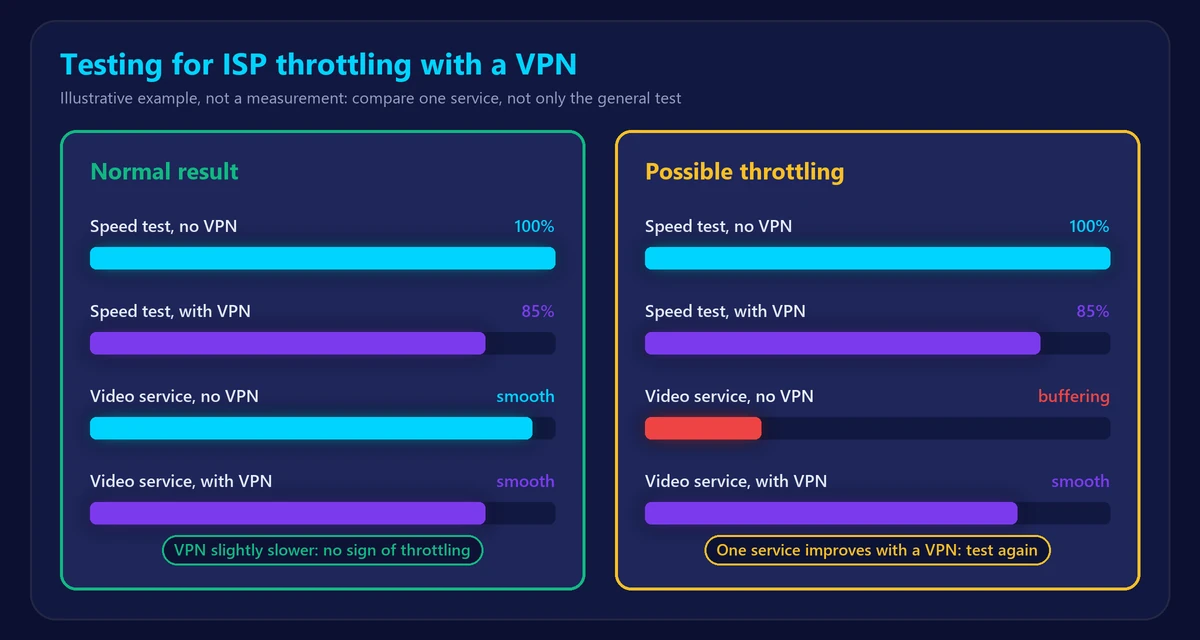
4. Compare with and without a VPN
A VPN hides which services you’re using from your provider, so it can reveal service-based throttling:
- Test your speed and try the slow service without the VPN.
- Connect to a nearby VPN server and repeat both.
- Compare the results.
A VPN normally makes a general speed test a little slower, because of encryption and the extra distance. So look at the specific service: if it becomes clearly faster with the VPN, while your general speed doesn’t, throttling or a routing problem is a real possibility. One test isn’t proof, so repeat it on different days.
What to do if you’re being throttled
- Check your plan: a plan with a higher or no data cap may cost less than you’d expect.
- Reduce heavy usage near the end of the billing cycle. Lowering streaming quality saves a lot of data.
- Contact your provider with dated test results and ask directly whether your plan has speed limits.
- Compare other providers if the limits don’t suit you.
- In the U.S., you can file a consumer complaint with the FCC if you believe your provider isn’t delivering what it disclosed.
A VPN can help with service-based throttling, but not with a data cap or a slow plan, because your provider still sees how much data you use.
Frequently asked questions
How do I know if my internet is being throttled?
Look for a pattern: a drop after heavy data use, or one service that is slow while your general speed test is fine. Test on a cable, at several times, with and without a VPN.
Is ISP throttling legal?
It depends on the country and sometimes the state. In many places it’s allowed if the provider discloses it. Check your provider’s terms and local rules.
Can a VPN stop throttling?
Sometimes. It can help when a provider limits specific services, because it hides what you’re using. It can’t remove a data cap or make a slow plan faster, and it may slightly reduce your speed.
Do providers throttle gaming?
It’s less common. Lag usually comes from high ping or WiFi problems. Check with our ping test and see how to lower ping.