100 Mbps is one of the most common internet plans in the U.S., and it’s also the new official broadband benchmark. But is 100 Mbps fast enough for streaming, gaming and working from home? For most small households, yes – 100 Mbps is fast and handles everyday use with room to spare. Larger or heavier-use homes may feel its limits. This guide explains exactly what 100 Mbps internet speed can handle and how to tell if it’s enough for you.
Is 100 Mbps fast? The quick answer
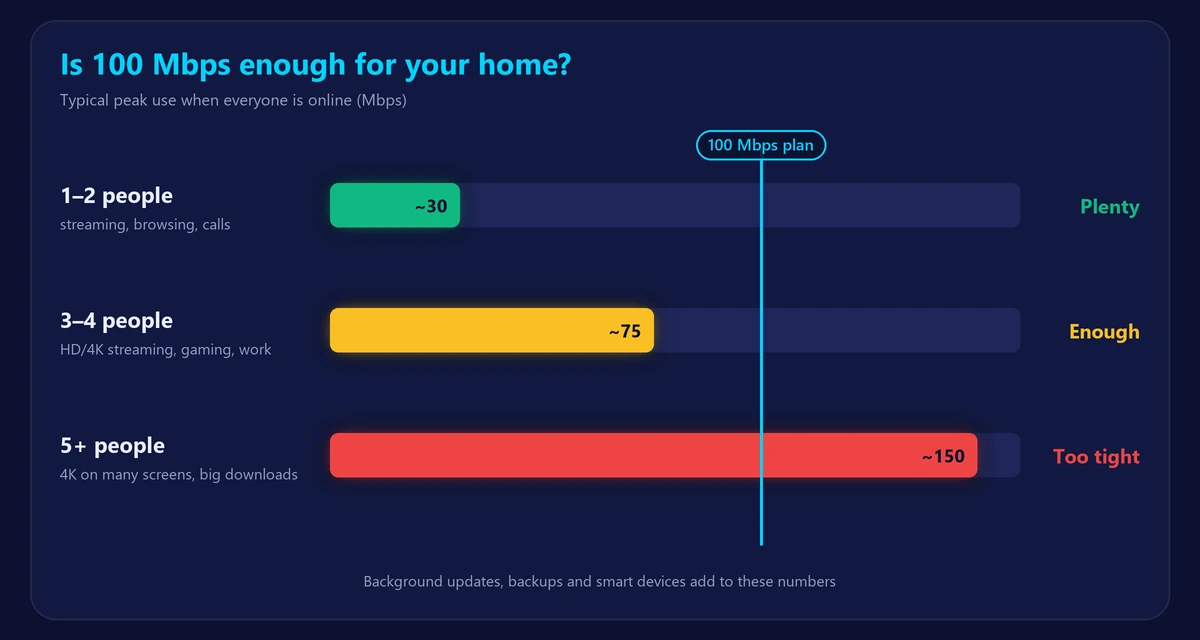
In 2024 the FCC set the minimum for “broadband” at 100 Mbps download and 20 Mbps upload. So 100 Mbps is a solid, modern baseline:
- Fast for 1–2 people, even with 4K streaming and video calls.
- Good for 3–4 people with normal use.
- Tight for 5+ people who stream 4K, game and download large files at the same time.
What can you do with 100 Mbps?
| Activity | Speed per device | How many at once on 100 Mbps* |
|---|---|---|
| HD streaming | 5–8 Mbps | 10+ |
| 4K streaming | 15–25 Mbps | 4–5 |
| HD video calls | 3–4 Mbps | 15+ |
| Online gaming | 1–5 Mbps | Many |
| Browsing and social media | 1–5 Mbps | Many |
*Rough estimates if nothing else is using the connection. In real homes, background updates, cloud backups and smart devices also take a share.
Is 100 Mbps good for streaming?
Yes. Netflix recommends about 5 Mbps for HD and 15 Mbps for 4K, so 100 Mbps can run several 4K TVs at once.
Is 100 Mbps good for gaming?
Yes for playing – online games use under 5 Mbps. The downside is downloads: a 100 GB game takes over two hours at 100 Mbps. For gaming, low ping matters more than raw speed; see is 300 Mbps good for gaming? for more details.
Is 100 Mbps good for working from home?
Usually yes. Video calls need only a few Mbps. The bigger question is upload speed: some 100 Mbps cable plans offer only 5–10 Mbps up, which can struggle with large file uploads. Learn more in what is a good upload speed.
How many devices can 100 Mbps support?
The number of devices matters less than what they do at the same time. A home with 15 connected devices – phones, a TV, a laptop, a smart speaker – is fine on 100 Mbps if only two or three are streaming at once. Problems start when several people stream 4K while a console downloads a game.
Signs 100 Mbps is not enough
- Video buffers or drops to lower quality in the evening when everyone is online.
- Video calls freeze when someone else starts a download.
- Game and system downloads take hours.
- You have 5 or more heavy users in the home.
Before upgrading, make sure the problem is your plan and not your WiFi. Run our speed test next to the router or with a cable. If you get close to 100 Mbps there but much less in other rooms, a better router or mesh system will help more than a faster plan – see why your WiFi is slow.
100 Mbps vs faster plans
| Plan | Good for | 100 GB game download |
|---|---|---|
| 100 Mbps | 1–3 people, streaming, browsing, calls | About 2 h 15 min |
| 300 Mbps | 3–5 people, gamers, remote workers | About 45 min |
| 500 Mbps | Busy households, 4K on many screens | About 27 min |
| 1 Gig | Large households and power users | About 13 min |
Not sure what you need? Our internet speed calculator estimates the right plan for your household in a few clicks. For more detail on the next step up, read is 500 Mbps fast?
Frequently asked questions
Is 100 Mbps good or bad?
Good. It meets the FCC broadband definition and comfortably handles streaming, calls and gaming for small households.
How fast is 100 Mbps in MB per second?
About 12.5 MB/s, because 1 byte = 8 bits. A 1 GB file downloads in roughly 80 seconds. See Mbps vs MB/s for the full explanation.
Is 100 Mbps enough for 4K Netflix?
Yes. One 4K stream uses about 15 Mbps, so you can watch several at once.
Why am I not getting 100 Mbps?
Distance from the router, walls, older devices and evening congestion all reduce speed. Test with a cable to see the true speed of your line.