Internet providers love to advertise 500 Mbps plans, but is 500 Mbps fast – and do you actually need it? The short answer: yes, 500 Mbps is fast. It is several times the U.S. broadband benchmark and more than enough for most homes. Whether it is the right plan for you depends on how many people share the connection and what they do online. This guide explains what 500 Mbps can handle, who benefits from it, and when a cheaper or faster plan makes more sense.
Is 500 Mbps fast? The quick answer
In 2024 the FCC raised its definition of broadband to 100 Mbps download and 20 Mbps upload. A 500 Mbps plan is five times that benchmark. In practice, that means:
- Every person in a busy household can stream, call and game at the same time without slowdowns.
- Large downloads finish quickly – a 50 GB game takes about 13 minutes at full speed.
- You have plenty of headroom for smart-home devices, cloud backups and software updates running in the background.
For comparison, see our guide to what a good internet speed is.
What 500 Mbps can handle at the same time
Most online activities need far less bandwidth than people expect. Typical requirements:
| Activity | Speed needed (per device) |
|---|---|
| HD streaming (1080p) | 5–8 Mbps |
| 4K streaming | 15–25 Mbps |
| HD video call (Zoom, Teams) | 3–4 Mbps |
| Online gaming (gameplay) | 1–5 Mbps |
| Cloud gaming in 4K | 35–45 Mbps |
| Browsing, email, social media | 1–5 Mbps |
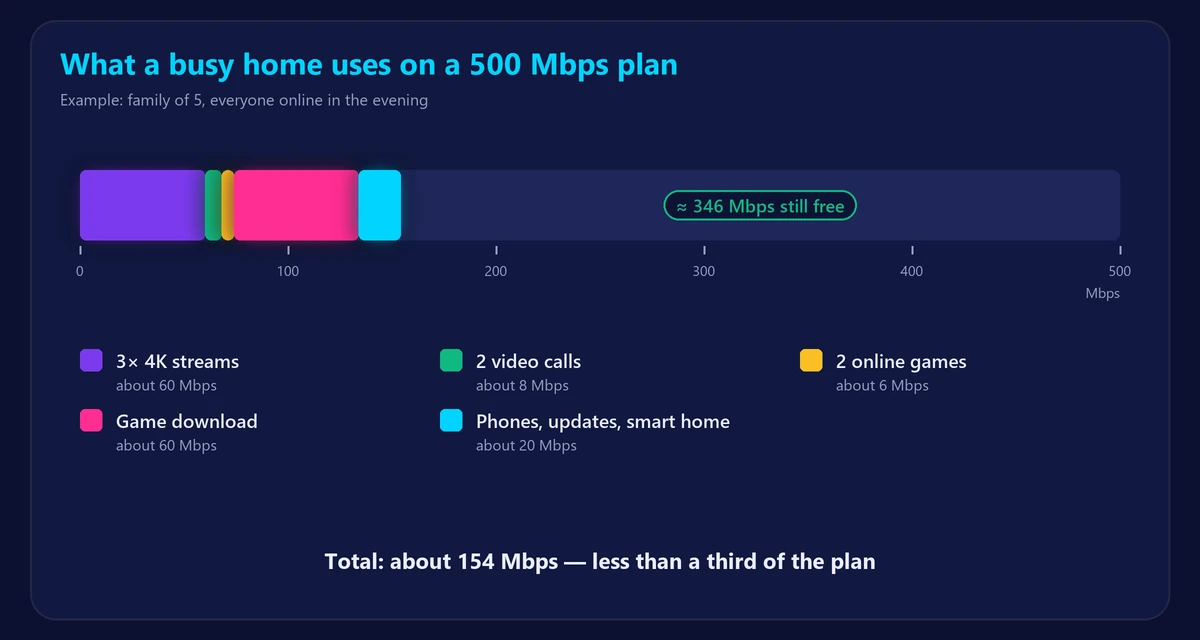
Add it up and a 500 Mbps connection could, on paper, carry around 20 simultaneous 4K streams. Even a large family rarely uses more than 100–150 Mbps at once – the rest is headroom that keeps everything smooth when several big downloads start together.
Who should get 500 Mbps?
- Households of 4 or more people who stream, game and work from home at the same time.
- Gamers who download big games – modern titles often exceed 100 GB, and faster downloads mean less waiting.
- Remote workers who move large files – especially if the plan also offers good upload speed.
- Homes with many smart devices: cameras, TVs, speakers and consoles all update in the background.
If you live alone or with one other person and mostly stream and browse, a 100–300 Mbps plan is usually enough. Use our internet speed calculator to estimate what your household really needs.
Will you actually get 500 Mbps?
Paying for 500 Mbps does not guarantee you will see 500 Mbps on every device. Common limits:
- WiFi: older WiFi 5 devices often top out around 200–400 Mbps in real use, and speed drops with distance and walls. WiFi 6 and newer devices close to the router do much better.
- Your router: an old router may not be able to pass 500 Mbps, especially over WiFi.
- Your device: older laptops and phones have slower network cards.
- Busy hours: speeds can dip in the evening on shared cable networks.
To check what you are really getting, run our speed test once on WiFi and once with a cable plugged into the router. If the wired result is close to 500 Mbps but WiFi is much lower, the bottleneck is inside your home – see Ethernet vs WiFi and our tips to boost your WiFi signal.
Don’t forget upload speed
Many cable plans advertise 500 Mbps download but only 10–50 Mbps upload. Upload matters for video calls, live streaming, sending large files and cloud backups. Fiber plans usually offer symmetrical speeds, such as 500/500 Mbps. If you work from home or create content, compare upload speeds too – our guide explains what a good upload speed is.
500 Mbps compared with other plans
| Plan | Best for | 50 GB download |
|---|---|---|
| 100 Mbps | 1–3 people, HD/4K streaming, browsing | About 67 minutes |
| 300 Mbps | 3–5 people, gaming, working from home | About 22 minutes |
| 500 Mbps | 4–6+ people, heavy streaming and big downloads | About 13 minutes |
| 1 Gig (1,000 Mbps) | Large households, power users, frequent huge downloads | About 7 minutes |
Download times are theoretical at full speed; real downloads are usually a little slower. Not sure how megabits relate to file sizes? Read Mbps vs MB/s explained.
Frequently asked questions
Is 500 Mbps good for gaming?
Yes. Online games need only a few Mbps; what matters more is low ping and stable jitter. 500 Mbps mainly helps you download games and updates faster. Check your latency with our ping test.
How many devices can 500 Mbps support?
Dozens. A typical home with 20–30 connected devices – phones, TVs, laptops, consoles and smart gadgets – runs comfortably on 500 Mbps.
Is 500 Mbps fast enough for 4K streaming?
Easily. A 4K stream uses about 15–25 Mbps, so 500 Mbps can carry many 4K streams at once.
Why does my speed test show less than 500 Mbps?
Usually because of WiFi, an older router or device, or network congestion. Test with an Ethernet cable to see the real speed reaching your home.