If you’re choosing an internet plan for gaming, you’ve probably wondered: is 300 Mbps good for gaming? Yes – 300 Mbps is more than good for gaming. In fact, online games use only a tiny fraction of that speed. What decides whether your games feel smooth is not just Mbps but ping, jitter and packet loss. This guide explains what 300 Mbps does for gamers, what it doesn’t do, and how to get the best gaming connection.
Is 300 Mbps good for gaming? The short answer
Yes. Console makers recommend only a few Mbps for online play – Xbox, for example, recommends at least 3 Mbps download and 0.5 Mbps upload. A 300 Mbps plan gives you:
- Plenty of speed for online multiplayer, even while others in the house stream 4K video.
- Fast game downloads – a 100 GB game takes roughly 45 minutes at full speed.
- Enough bandwidth for cloud gaming services in 4K.
- Room to stream your own gameplay, as long as your upload speed is good.
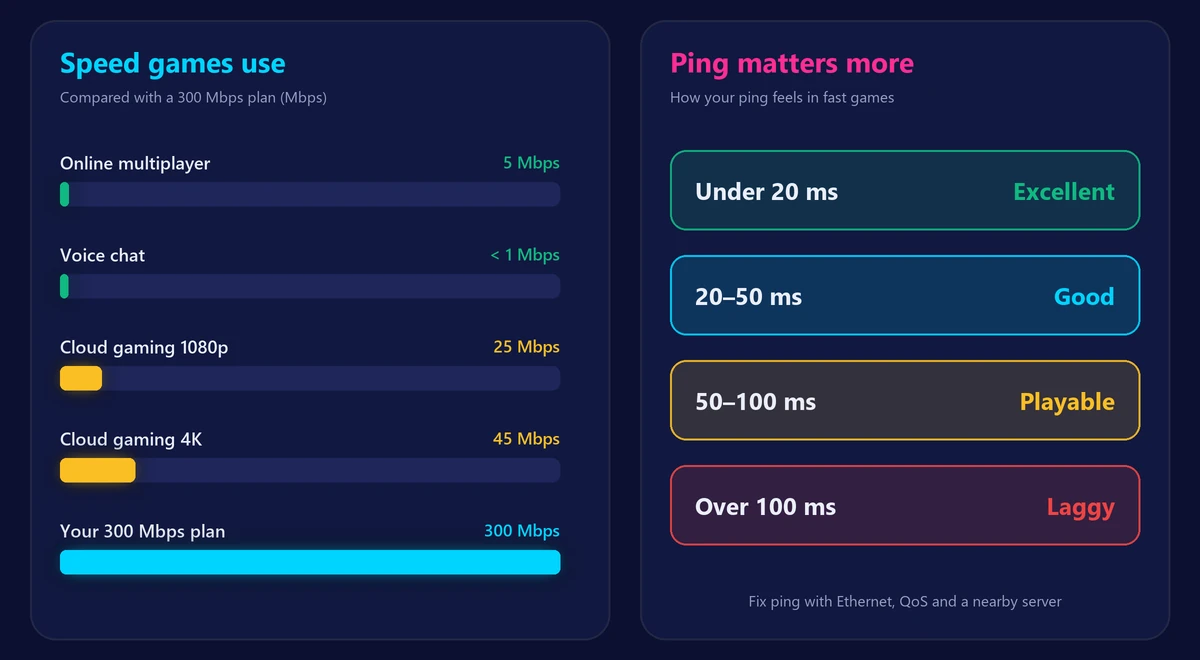
How much speed games actually use
| Activity | Typical speed used |
|---|---|
| Online multiplayer (Fortnite, Call of Duty, FIFA…) | Under 5 Mbps |
| Voice chat (Discord, party chat) | Under 1 Mbps |
| Cloud gaming in 1080p | 15–25 Mbps |
| Cloud gaming in 4K | 35–45 Mbps |
| Streaming your gameplay on Twitch/YouTube | 3–8 Mbps upload |
So why do gamers still want fast plans? Mostly for downloads: new games and patches are huge, and on slower connections they can take hours. With 300 Mbps, the wait is usually under an hour even for the biggest titles.
Ping matters more than Mbps
Ping (latency) is the time it takes data to travel to the game server and back. Jitter is how much that ping jumps around. A 300 Mbps connection with 80 ms ping feels worse in a shooter than a 50 Mbps connection with 15 ms ping.
| Ping | Gaming experience |
|---|---|
| Under 20 ms | Excellent – ideal for competitive shooters |
| 20–50 ms | Good – smooth for almost all games |
| 50–100 ms | Playable – noticeable in fast-paced games |
| Over 100 ms | Laggy – delayed hits and rubber-banding |
Test your latency, jitter and packet loss with our free ping test, and read what jitter is if your ping keeps jumping.
When 300 Mbps isn’t enough
- Big household, everyone online at once: if several people stream 4K, download games and join video calls at the same time, a 500 Mbps plan gives more headroom. See is 500 Mbps fast?
- Low upload speed: many 300 Mbps cable plans have only 10–20 Mbps upload. That’s fine for playing, but tight if you stream gameplay in high quality while others upload too.
- You download new games every week: gigabit plans cut download times roughly by a third compared with 300 Mbps.
How to get a better gaming connection on 300 Mbps
- Use an Ethernet cable for your console or gaming PC. It lowers ping and removes WiFi jitter. Compare the options in Ethernet vs WiFi.
- If you must use WiFi, use 5 GHz near the router – see 5GHz vs 2.4GHz WiFi.
- Enable QoS in your router to prioritize gaming traffic over downloads.
- Pause big downloads and cloud backups while you play.
- Pick the closest game server region in your game’s settings.
For more fixes, read our guide on how to lower ping for gaming.
Frequently asked questions
Is 300 Mbps fast internet?
Yes. It’s three times the FCC’s 100 Mbps broadband benchmark and enough for most households of 3–5 people.
Is 300 Mbps good for PS5 and Xbox?
Yes. Online play needs only a few Mbps; 300 Mbps mostly makes downloads and updates much faster.
Is 300 Mbps enough for Netflix?
Easily. Netflix recommends about 15 Mbps for 4K, so 300 Mbps can handle many 4K streams at once.
Do I need 1 Gig for gaming?
Not for playing. Gigabit only helps if you download large games often or share the connection with many heavy users.
How do I check if I’m getting 300 Mbps?
Run our internet speed test with your device connected by cable. If WiFi results are much lower, the issue is your WiFi, not your plan.