Your phone loads pages quickly on mobile data, but as soon as you connect your laptop to its hotspot, everything crawls. Why is my hotspot so slow? In most cases it’s one of three things: your plan limits hotspot speed, the phone has a weak cellular signal, or the connection between the phone and your laptop is the bottleneck. This guide helps you find which one – and gives you 10 ways to make your hotspot faster.
Why your hotspot is slow
1. Your plan caps hotspot speed
Many “unlimited” phone plans include only a limited amount of high-speed hotspot data. After you use it, hotspot speed is often cut to a few hundred kbps or a few Mbps – while the phone itself still browses at full speed. Some plans also cap hotspot speed from the start. Check your carrier app for your hotspot data allowance.
2. Weak cellular signal or a busy network
Indoors, in basements or at the edge of coverage, your phone may have only one or two bars of LTE or 5G. Crowded places and evenings also slow mobile networks. Some plans have lower priority during congestion (“deprioritization”).
3. The link between phone and laptop
Phones often create their hotspot on the slower 2.4 GHz band, have weaker WiFi antennas than routers, and slow down when several devices connect.
4. Your laptop eats the data
Laptops assume they’re on home WiFi: they download system updates, sync cloud folders and back up photos in the background – all through your hotspot.
5. Battery saving and heat
Low Power Mode, Low Data Mode and a hot phone can all throttle hotspot performance.
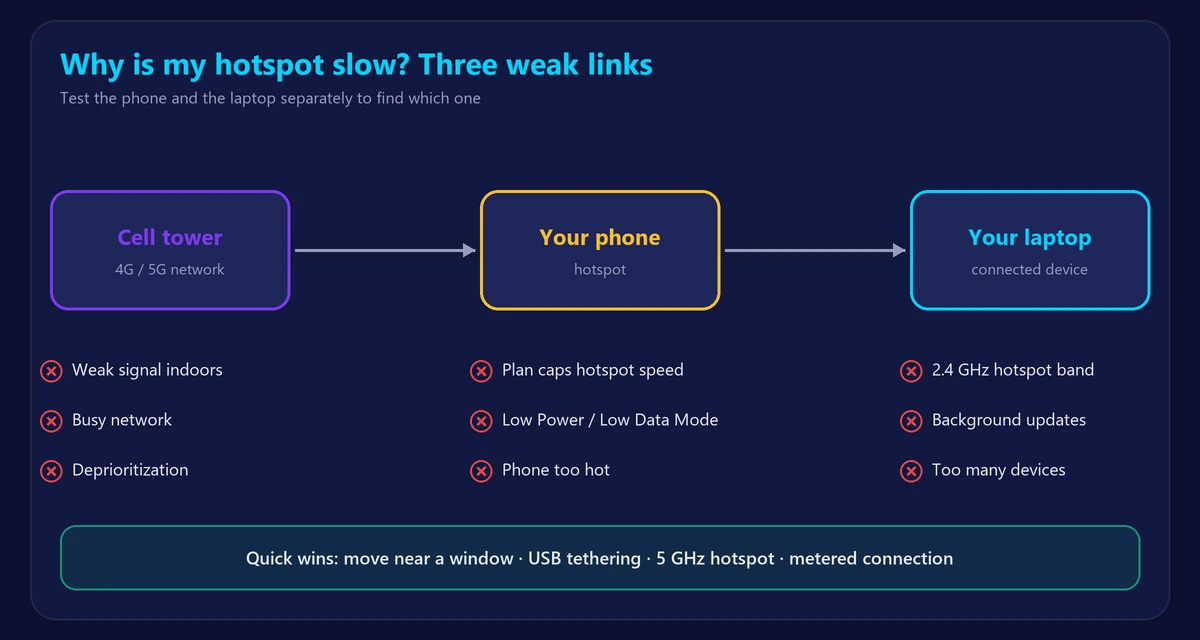
Step 1: Find the bottleneck
- Run our speed test on the phone itself (on mobile data).
- Run the same test on the laptop connected to the hotspot.
- Both slow → weak signal, network congestion or a slow plan.
- Phone fast, laptop slow → a hotspot speed cap, the WiFi link between the devices, or laptop background downloads.
10 ways to make your hotspot faster
- Check your hotspot allowance in your carrier app; buy more high-speed hotspot data or change plans if you’ve hit the cap.
- Move the phone to a better spot – near a window, higher up, away from thick walls. A few feet can add a bar of signal.
- Use 5 GHz for the hotspot. On iPhone, turn off Maximize Compatibility in Settings → Personal Hotspot. On Android, look for an AP band or 5 GHz option in hotspot settings. See 5GHz vs 2.4GHz.
- Use USB tethering instead of WiFi – it’s often faster, more stable and charges the phone at the same time.
- Set the hotspot as a metered connection on Windows (Settings → Network & internet → WiFi → your hotspot → Metered connection) so updates pause.
- Pause cloud sync and backups (OneDrive, iCloud, Google Drive, Dropbox) while on the hotspot.
- Turn off Low Power Mode and Low Data Mode on the phone.
- Disconnect devices you don’t need from the hotspot.
- Toggle airplane mode for 10 seconds to reconnect to a better cell tower, or restart the phone.
- Keep the phone cool – take it out of a thick case and away from direct sunlight.
How fast should a hotspot be?
On a good 5G or LTE signal without a cap, a hotspot can deliver 20–100+ Mbps, enough for video calls and streaming. Below about 5 Mbps, video calls and HD streaming become difficult. If you rely on a hotspot every day, a home internet plan or a dedicated 5G home internet service is usually faster and cheaper per GB – compare with our T-Mobile Home Internet speed test page.
Hotspot works but the internet doesn’t?
If your laptop is connected to the hotspot but nothing loads, the issue is the same as on home WiFi – read WiFi connected but no internet. And if the problem is the laptop’s WiFi in general, see laptop won’t connect to WiFi.
Frequently asked questions
Why is my hotspot slower than my phone’s data?
Usually because your plan limits hotspot speed or data, or because your laptop is downloading updates in the background.
Is USB tethering faster than WiFi hotspot?
Often yes. It avoids WiFi interference and keeps the phone charged, which also prevents battery-saving slowdowns.
Does 5G make my hotspot faster?
It can, if you have a strong 5G signal and your plan doesn’t cap hotspot speed.
How can I check my hotspot speed?
Connect your laptop to the hotspot and run our internet speed test. Check ping too with the ping test.