Your phone or laptop shows full WiFi bars, but nothing loads. Windows says “No internet, secured”, Android says “Connected without internet”, and your iPhone shows “No Internet Connection” under the network name. When your WiFi is connected but no internet works, the WiFi itself is fine – the problem is somewhere between your router and the rest of the internet, or in your device’s settings. This guide helps you find the cause and fix it fast.
What “connected but no internet” means
Your device has a working connection to the router, but the router isn’t passing internet traffic, or your device can’t use it. Typical causes:
- The modem lost its connection to your provider (outage or line problem).
- The router is frozen or the cable between modem and router is loose.
- Your device has a bad IP address or DNS setting.
- A VPN, proxy or security app is blocking traffic.
- You’re on a public network that needs a login page (captive portal).
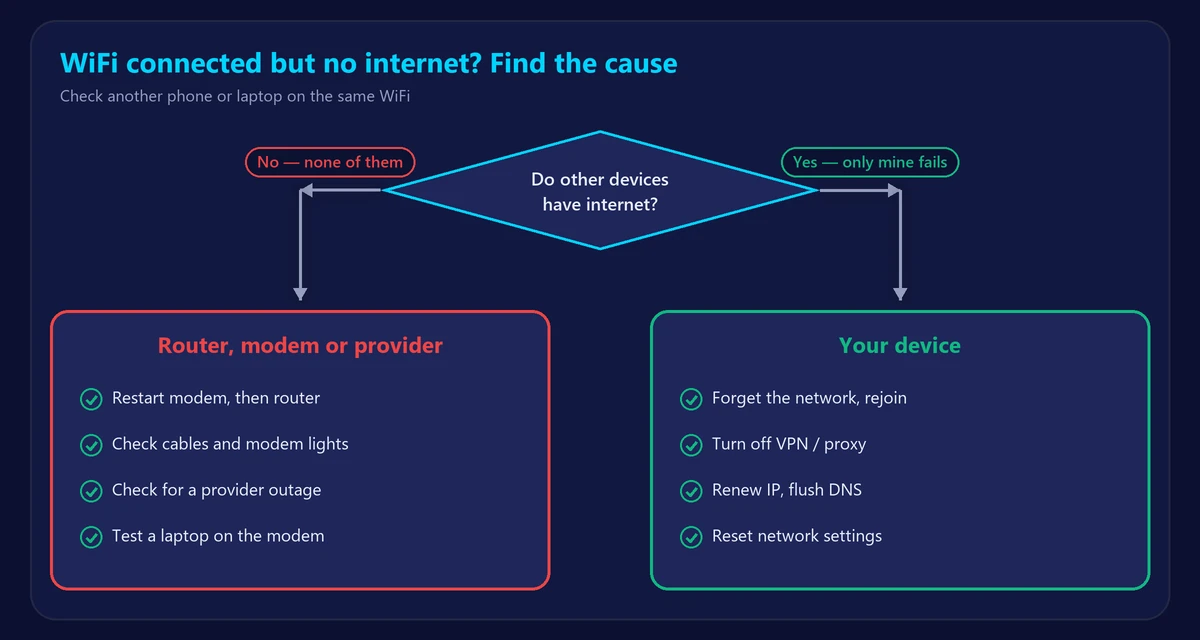
Step 1: One device or all devices?
This single question tells you where to look:
- All devices have no internet → the problem is the router, the modem or your provider. Start with fixes 1–4.
- Only one device → the problem is that device. Jump to fixes 5–10.
Fixes when all devices have no internet
1. Restart the modem and router
Unplug both for 30 seconds. Plug in the modem first and wait until its lights are stable, then the router. This fixes most cases. See how to restart or reset your router.
2. Check the modem lights and cables
Make sure the cable from the wall to the modem and from the modem to the router’s WAN/Internet port is firmly connected. A red or blinking Online light on the modem points to a line or provider problem. Not sure which box is which? Read modem vs router.
3. Check for a provider outage
Use your provider’s app or status page, or check its social accounts from mobile data. If there’s an outage, all you can do is wait.
4. Bypass the router
Connect a laptop directly to the modem with an Ethernet cable and restart the modem. If the internet works, your router is the problem – update its firmware or reset it.
Fixes when only one device has no internet
5. Turn WiFi off and on, then forget the network
Forget the network on the device and reconnect with the password. This clears corrupted connection settings.
6. Disable VPN, proxy and security apps
A VPN that failed to connect or an antivirus web shield can block all traffic. Turn them off and test again.
7. Renew the IP address and clear DNS (Windows)
Open Command Prompt and run:
ipconfig /release
ipconfig /renew
ipconfig /flushdns
On a Mac, open System Settings → Network → WiFi → Details → TCP/IP → Renew DHCP Lease.
8. Change your DNS server
If websites don’t load but the connection looks fine, your DNS may be failing. Try 1.1.1.1 (Cloudflare) or 8.8.8.8 (Google) – see our guide to the best DNS servers.
9. Check date, time and captive portals
A wrong date breaks secure websites. On hotel, airport or café WiFi, open any website such as example.com to trigger the login page.
10. Reset network settings
- Windows 10/11: Settings → Network & internet → Advanced network settings → Network reset.
- iPhone: Settings → General → Transfer or Reset iPhone → Reset → Reset Network Settings.
- Android: Settings → System → Reset options → Reset WiFi, mobile & Bluetooth (names vary by brand).
You’ll need to re-enter WiFi passwords afterwards.
Once you’re back online
Run our speed test and ping test to confirm the connection is healthy. High packet loss or repeated drops point to a line problem your provider should fix. If the connection keeps cutting out, read why your WiFi keeps disconnecting.
Frequently asked questions
Why does my WiFi say connected but no internet?
Your device reaches the router, but the router can’t reach your provider, or the device has a wrong IP/DNS setting. Restarting the modem and router fixes most cases.
Why is it only my laptop that has no internet?
Then the router is fine. Forget the network, disable VPNs, renew the IP address, update the WiFi driver or reset the laptop’s network settings.
Can a bad router cause no internet?
Yes. If the internet works when you plug a computer straight into the modem, the router is likely faulty or misconfigured.
What does “No internet, secured” mean on Windows?
It means you’re connected to a password-protected WiFi network, but Windows can’t reach the internet through it. Follow the steps above.