Your downloads are fast, but uploading a video takes forever, your face freezes on video calls and cloud backups never seem to finish. If your upload speed is so slow compared to your download, you’re not alone. In most cases it’s either how your connection is designed or something in your home using the upload. This guide helps you find the real cause in a few minutes and fix it.
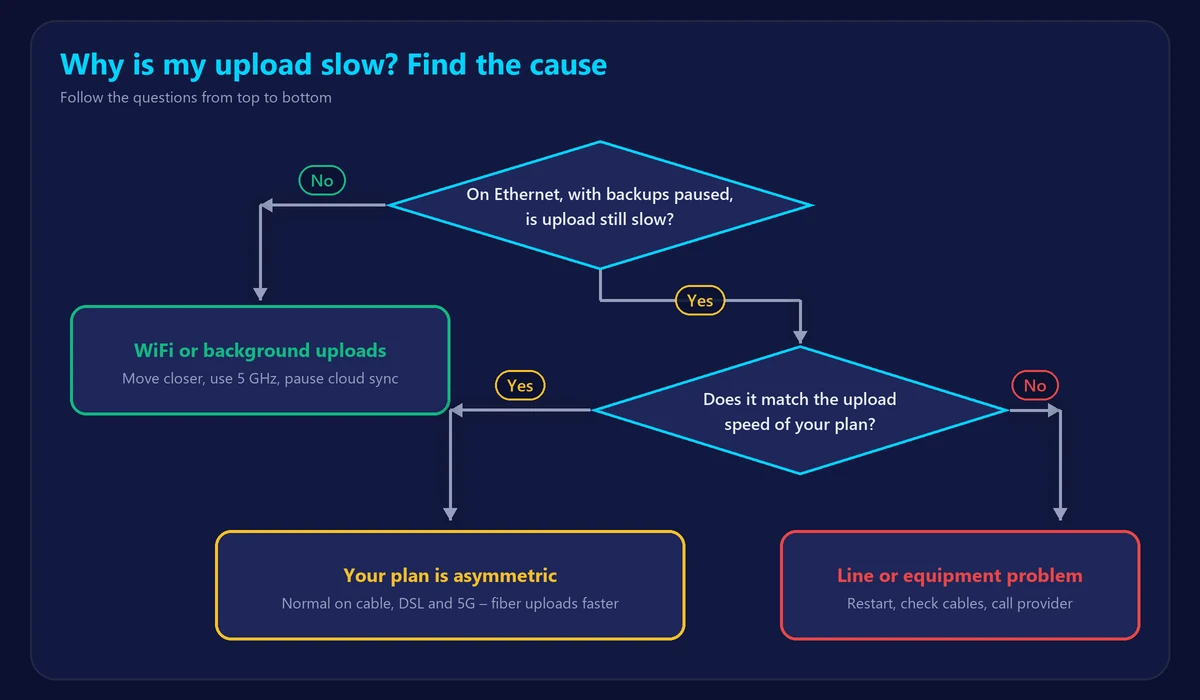
Step 1: Measure your upload properly
- Connect a computer to your router with an Ethernet cable.
- Pause cloud sync (iCloud, Google Drive, OneDrive, Dropbox), backups and video calls on every device.
- Run our speed test and note your upload result.
- Compare it with the upload speed of your plan – not the download speed.
Not sure what number to expect? Our guide to what counts as a good upload speed lists typical values by connection type.
Step 2: Is it slow by design?
Most connections are asymmetric: they give far more capacity to downloads than uploads. On cable, DSL, satellite and many 5G home plans, an upload 10 to 30 times lower than the download is normal. If your test result matches your plan’s upload speed, your connection is working as sold – the only real fix is a different plan or technology, usually fiber.
Step 3: Common causes of slow upload
Background uploads
Cloud photo backups, file sync, security cameras and even game recordings upload continuously. Because upload capacity is small, a single phone backing up photos can use all of it. This is the most common cause of “suddenly slow” uploads.
WiFi problems
Upload depends on your device’s WiFi transmitter, which is weaker than the router’s. A phone or laptop far from the router may download reasonably but upload very slowly. Test close to the router or on a cable to compare, and read how to boost your WiFi signal.
An old or overloaded router
Older routers can struggle with many devices or fast connections. A restart often helps; if not, the router may need replacing.
Line or signal problems
Damaged cables, loose coaxial connectors or a weak cellular signal on 5G home internet reduce upload more than download. Check every connection from the wall to the router.
Network congestion
Shared networks can slow down in the evening. If your upload is fine during the day but drops at night, see our guide on slow internet at night.
Step 4: How to fix slow upload speed
- Pause or schedule cloud backups for the night, and limit their upload speed in the app settings if possible.
- Use Ethernet for computers that upload large files or make important video calls.
- Restart your modem and router to clear temporary issues.
- Turn on QoS and prioritize video calls so other uploads don’t freeze them.
- Update router firmware through your router’s admin page.
- Contact your provider if wired upload is far below your plan – bring screenshots of several tests.
- Upgrade to fiber if you regularly upload large files: fiber plans usually offer upload as fast as download.
Quick diagnosis
| What you see | Likely cause |
|---|---|
| Upload matches your plan, but feels slow | Asymmetric plan – upgrade plan or technology |
| Upload fine on cable, slow on WiFi | WiFi signal or device |
| Upload jumps up when backups are paused | Background uploads |
| Upload slow only in the evening | Network congestion |
| Upload far below plan, even on cable | Line, equipment or provider issue |
Frequently asked questions
Why is my upload speed slower than my download?
Because most internet plans are designed that way. Households download much more than they upload, so providers allocate most capacity to downloads. Only fiber plans are commonly symmetrical.
Can a new router improve upload speed?
It can if your current router or its WiFi is the bottleneck. It can’t raise the upload limit of your plan.
Does slow upload affect gaming?
Games use little upload, but if something else fills your upload, your ping can spike badly. Check with our ping test while a backup is running to see the effect.