Want to know how fast your WiFi really is? There are two numbers you can check: the internet speed your WiFi actually delivers, and the link speed between your device and the router. This guide shows how to check WiFi speed the right way – with a free online test and directly on Windows, Mac, iPhone, Android and your router – and how to read the results.
The fastest way: run a WiFi speed test
- Connect your phone or computer to your WiFi network.
- Open our free WiFi speed test and press START.
- In about 30 seconds you’ll see your download speed, upload speed, ping and jitter.
This shows the real speed your WiFi gets from the internet – the number that matters for streaming, gaming and video calls. Not sure if your result is good? Enter it in our Is My Internet Speed Good? checker.
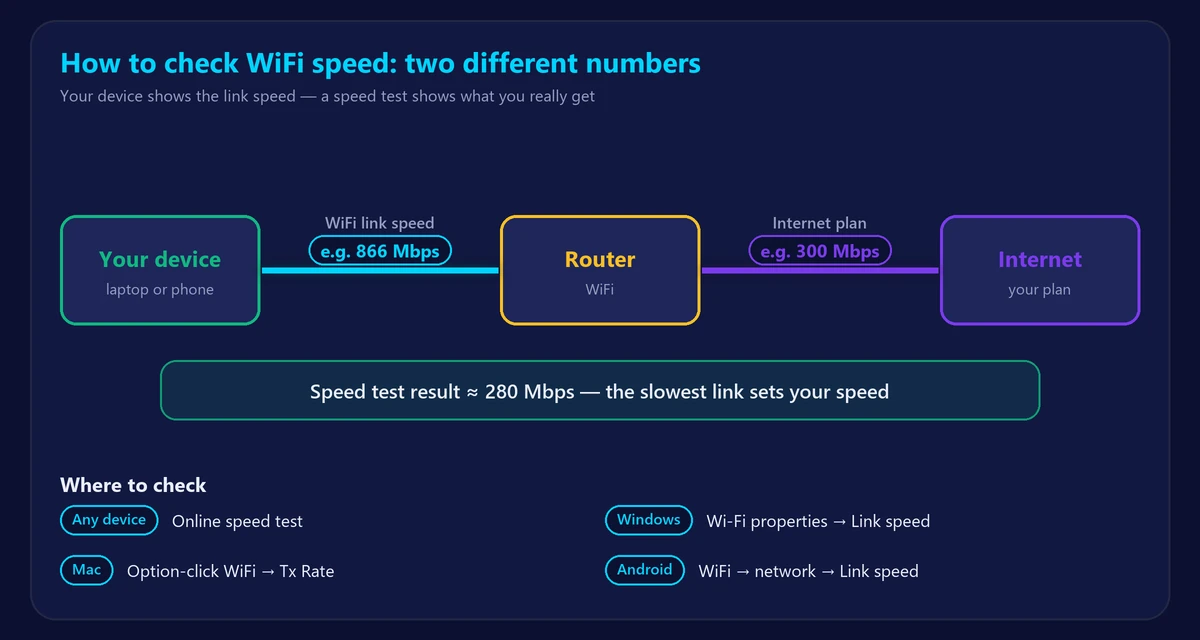
Link speed vs internet speed: why the numbers differ
Your device settings often show a much higher number, like 866 Mbps or 1.2 Gbps. That’s the link speed: the maximum rate between your device and the router over WiFi. It does not include the internet connection behind the router.
| Link speed | Internet speed (speed test) | |
|---|---|---|
| What it measures | Device ↔ router over WiFi | Device ↔ internet, through router and provider |
| Where you see it | Device WiFi settings | An online speed test |
| Typical value | Often 300–2,400 Mbps near the router | Up to your plan’s speed |
| Useful for | Checking WiFi signal quality | Checking what you actually get |
A good rule: if your link speed is high but the speed test is low, the bottleneck is your internet plan or provider. If both are low, it’s your WiFi signal.
How to check WiFi speed on Windows
- Link speed (Windows 11): Settings → Network & internet → Wi-Fi → [your network] properties. Look for Link speed (Receive/Transmit).
- Windows 10: Settings → Network & Internet → Wi-Fi → click your network, or Control Panel → Network and Sharing Center → your WiFi → Speed.
- Command line: run
netsh wlan show interfacesand check Receive rate and Transmit rate. - Live usage: Task Manager → Performance → Wi-Fi shows how much data is flowing right now.
How to check WiFi speed on Mac
Hold the Option key and click the WiFi icon in the menu bar. Tx Rate is your current link speed in Mbps; RSSI shows signal strength.
How to check WiFi speed on iPhone and iPad
iOS doesn’t show the link speed in Settings. The simplest way is to open our speed test in Safari while connected to WiFi. Your router’s app may also show the speed of each connected device.
How to check WiFi speed on Android
Go to Settings → Network & internet (or Connections) → Wi-Fi → tap your network. Many phones show Link speed or Transmit/Receive link speed there. For the real internet speed, run a speed test in your browser.
How to check WiFi speed in your router
Most router apps and admin pages list connected devices with their WiFi band and link speed – useful for spotting a device stuck on a slow connection. To log in, see our router login guide.
How to get an accurate WiFi speed test
- Test near the router first, then in the room where WiFi feels slow, and compare.
- Pause downloads, streaming and backups on other devices.
- Use 5 GHz if your device supports it – see 5GHz vs 2.4GHz WiFi.
- Test a few times and at different hours – evenings are often slower. Read why internet is slow at night.
- Compare with a cable: a wired test shows your plan’s real speed – see Ethernet vs WiFi.
How to read your results
| Result | Good value | What it affects |
|---|---|---|
| Download | 25+ Mbps per person | Streaming, browsing, downloads |
| Upload | 10+ Mbps | Video calls, sending files, live streaming |
| Ping | Under 50 ms | Gaming, calls, responsiveness |
| Jitter | Under 30 ms | Smooth calls and games |
For a deeper look at latency, use our ping test. And if you want to convert Mbps into download speed in MB/s, see Mbps vs MB/s.
WiFi slower than it should be?
Start with our guide on why your WiFi is slow and how to fix it, then try these tips to boost your WiFi signal. If several rooms have weak WiFi, a mesh system may help – compare in mesh WiFi vs extender.
Frequently asked questions
How do I check my WiFi speed for free?
Connect to your WiFi and run a free online WiFi speed test. It measures download, upload, ping and jitter in about 30 seconds, with no app or signup.
Why is my WiFi link speed higher than my speed test?
Link speed is only the connection between your device and the router. The speed test also includes your internet plan, your provider’s network and the route to the test server.
What is a good WiFi speed?
For most homes, 100 Mbps or more download is good, and 200–500 Mbps is comfortable for busy families. See what a good internet speed is.
How often should I test my WiFi speed?
Whenever something feels slow, after changing routers or plans, and occasionally at different times of day to see if your provider delivers consistent speeds.