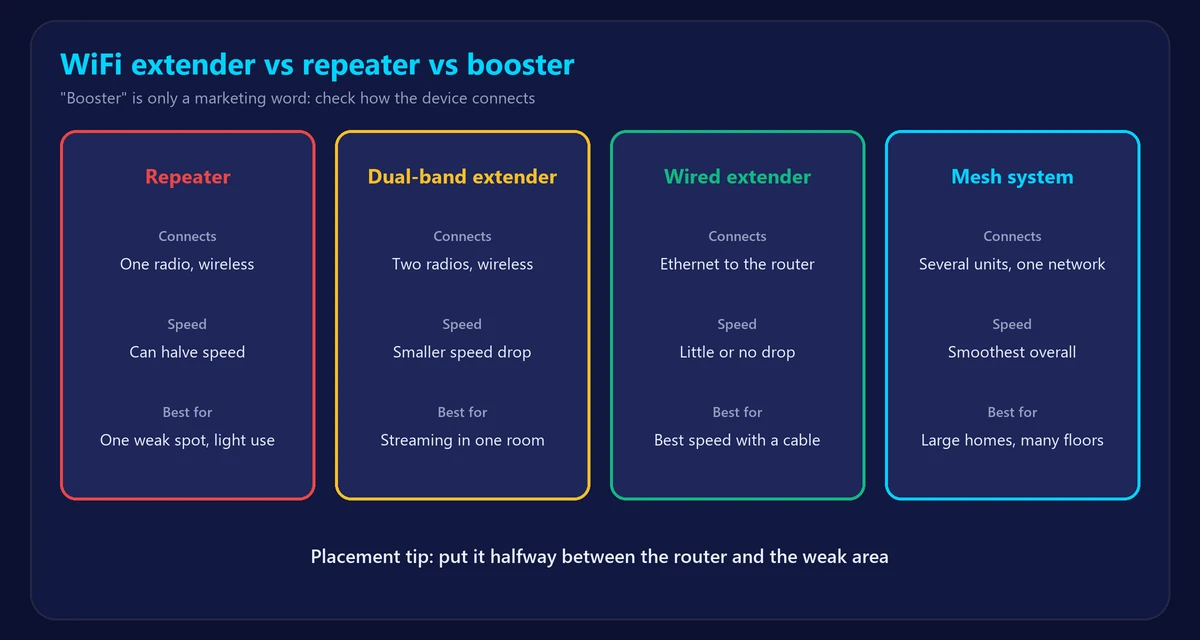
Shop for better WiFi coverage and you’ll see extenders, repeaters and boosters, often describing nearly identical products. So what’s the real difference in WiFi extender vs repeater vs booster, and which one should you buy? In short: “booster” is a marketing word, a “repeater” rebroadcasts your signal wirelessly, and an “extender” is usually a better repeater that may also connect by cable. This guide explains what actually matters.
The quick comparison
| Device | How it connects to the router | Speed impact | Best for |
|---|---|---|---|
| Basic repeater | Wireless, one radio | Can cut speed roughly in half | Light use in one weak spot |
| Dual-band extender | Wireless, two radios | Smaller drop if placed well | Streaming in one extra room |
| Wired extender (access point) | Ethernet cable | Little or none | Best speed if you can run a cable |
| Powerline with WiFi | Home electrical wiring | Varies with the wiring | Thick walls, no way to run a cable |
| Mesh system | Wireless or wired, managed as one network | Usually the smoothest | Large or multi-floor homes |
“Booster” doesn’t describe a specific technology. It can mean any of these, so check the specifications rather than the name.
What is a WiFi repeater?
A repeater picks up your router’s signal and sends it out again. A simple single-radio model has to receive and transmit on the same channel, taking turns, so available speed can fall by about half. Because it repeats whatever it receives, it also repeats a weak signal if it’s placed too far from the router.
What is a WiFi extender?
“Extender” is a broader term. Many extenders use two bands or more: one radio talks to the router while the other serves your devices, which avoids most of the repeater penalty. Models with an Ethernet port can also connect to the router by cable, which gives the best results.
Do WiFi boosters actually work?
Yes, within limits. They improve coverage, not your internet plan. They can’t make your connection faster than your plan or the signal they receive. They help most when a device has no usable signal at all. Be skeptical of cheap plug-in “boosters” that promise huge speed increases.
Where to place an extender
Placement matters more than the brand. Put it halfway between the router and the weak area, not in the weak area itself. It needs a strong signal to pass on.
- Check the WiFi signal strength where you plan to plug it in. Aim for about −65 dBm or better.
- Avoid cupboards, large metal objects and the kitchen.
- Run our speed test before and after, in the room you care about.
- Move it a little closer to the router if speeds are still low.
Extender or mesh?
An extender is a low-cost fix for one dead spot. If you need coverage across a large home, or want your devices to switch smoothly between access points, mesh is usually the better purchase. Our full comparison is in mesh WiFi vs extender.
Try these first: they’re free
- Move your router to a central, open and raised spot.
- Change to a less crowded channel.
- Use 2.4 GHz for far-away devices and 5 GHz nearby – see how to check which band you’re on.
- Replace a router that’s past its best – see how long routers last.
More ideas in our guide to boost your WiFi signal.
Frequently asked questions
Is a WiFi extender the same as a repeater?
Not exactly, though the names are often used interchangeably. A repeater simply rebroadcasts the signal. Extenders often use two radios or a cable connection and lose less speed.
Does a WiFi extender increase speed?
Only in the area where the signal was weak. It can’t exceed your plan’s speed, and devices connected through it may be slower than those close to the router.
Can I use more than one extender?
You can, but chaining them wirelessly multiplies the speed loss. If you need more than one, a mesh system is usually better.
Why is my internet slow on the extender?
Usually because it’s too far from the router, so it’s repeating a weak signal. Move it closer, or connect it by Ethernet if possible.