WiFi bars only tell part of the story. If you want to know whether your connection is truly strong enough for streaming, video calls or gaming, you need to understand WiFi signal strength in dBm. This guide explains what dBm means, what counts as a good WiFi signal, how to measure it on any device, and how to improve a weak signal.
What is dBm?
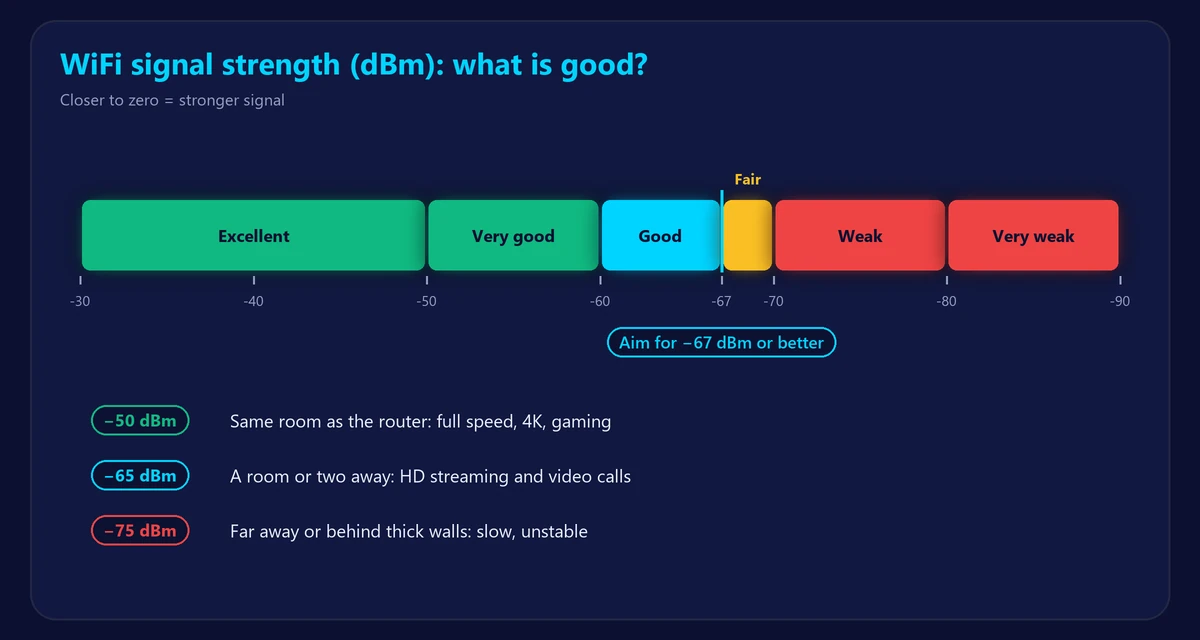
WiFi signal strength is measured in dBm (decibel-milliwatts). The values are negative, and closer to zero means stronger: −40 dBm is a much stronger signal than −80 dBm. The scale is logarithmic, so every 3 dBm is roughly a doubling or halving of signal power, and every 10 dBm is ten times stronger or weaker.
What is a good WiFi signal strength?
| Signal (dBm) | Quality | What it’s good for |
|---|---|---|
| −30 to −50 | Excellent | Everything, at full speed – usually in the same room as the router |
| −50 to −60 | Very good | 4K streaming, gaming, large downloads |
| −60 to −67 | Good | HD streaming and video calls; −67 dBm is a common minimum for reliable calls |
| −67 to −70 | Fair | Browsing and email; calls may stutter |
| −70 to −80 | Weak | Slow and unreliable connection |
| Below −80 | Very weak | Frequent drops or no connection |
For most homes, aim for −67 dBm or better wherever you use WiFi regularly.
How to check WiFi signal strength
Windows
Open Command Prompt and run:
netsh wlan show interfacesLook at the Signal line. Windows shows a percentage rather than dBm: roughly, 100% ≈ −50 dBm or better, 70% ≈ −65 dBm, 50% ≈ −75 dBm and 30% ≈ −85 dBm.
Mac
Hold the Option key and click the WiFi icon in the menu bar. The RSSI value is your signal strength in dBm; “Noise” shows background interference.
Android
Some phones show signal strength in the network details (Settings → Network & internet → Internet → tap your network). Free WiFi analyzer apps also show dBm in real time and help you find less crowded channels.
iPhone
iOS doesn’t show dBm in Settings. You can install Apple’s free AirPort Utility app, enable its Wi-Fi Scanner in Settings → AirPort Utility, and scan to see RSSI values.
Signal strength vs internet speed
A strong signal doesn’t guarantee fast internet, and a weaker signal isn’t always slow. Speed also depends on your plan, the WiFi band, interference from neighbors and how busy the network is. The best way to see the real effect is to run our speed test next to the router and then in the room with the weaker signal. Compare the two results – a big drop confirms a coverage problem. Use our ping test too: weak signals often cause high jitter and packet loss.
What weakens WiFi signal?
- Distance from the router.
- Walls and floors, especially concrete, brick, metal and mirrors.
- Interference from neighbors’ networks, microwaves and Bluetooth devices.
- The band: 5 GHz and 6 GHz are faster but weaker through walls than 2.4 GHz – see 5GHz vs 2.4GHz WiFi.
- Router placement – in a corner, a cabinet or on the floor.
- An aging router – read how long routers last.
How to improve a weak WiFi signal
- Move the router to a central, high, open spot.
- Keep it away from thick walls, metal objects and the microwave.
- Pick a less crowded channel, or let the router choose automatically.
- Use 2.4 GHz for distant devices and 5 GHz near the router.
- Add a mesh system for large or multi-floor homes – compare in mesh WiFi vs extender.
- Upgrade to a WiFi 6 or newer router if yours is old.
More ideas in our guide to boost your WiFi signal.
Frequently asked questions
Is −70 dBm a good WiFi signal?
It’s fair. Browsing works, but video calls and streaming may be unreliable. Aim for −67 dBm or better.
Is −50 dBm good for WiFi?
Yes, −50 dBm is an excellent signal.
What is a good WiFi signal strength for gaming?
−60 dBm or better. For the most stable ping, use an Ethernet cable – see Ethernet vs WiFi.
Why do I have full bars but slow WiFi?
Bars only show signal strength. Interference, a congested network, an old router or a slow plan can still make the connection slow.