Many people use “WiFi” and “internet” as if they meant the same thing – “the WiFi is down”, “I need better WiFi”. But they’re different, and knowing the difference between WiFi vs internet makes it much easier to fix problems and choose the right upgrade. In short: the internet is the service you pay for; WiFi is the wireless network that carries it around your home.
What is the internet?
The internet is the global network of computers and servers – websites, streaming services, games and apps. To reach it, you pay an internet service provider (ISP) such as Xfinity, Spectrum, AT&T or Verizon. The provider brings the connection to your home through cable, fiber, a phone line, satellite or a cellular signal, and your plan sets the maximum speed (for example 300 Mbps).
What is WiFi?
WiFi is a wireless technology that connects your devices to your router without cables. Your router creates a local network – the WiFi name and password you see – and passes internet traffic between your devices and the modem. WiFi works only within a limited range, usually one home, and it works even without internet: devices can still print, cast or share files over WiFi when the internet is down.
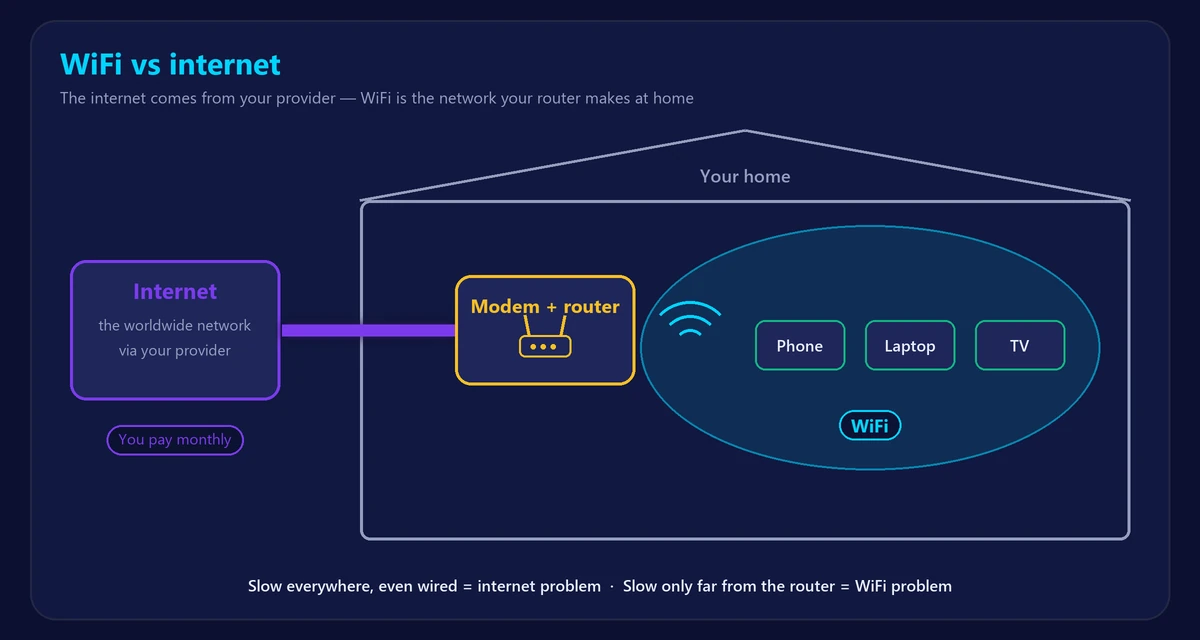
WiFi vs internet at a glance
| Internet | WiFi | |
|---|---|---|
| What it is | A service connecting you to the world | A wireless local network in your home |
| Who provides it | Your internet provider (ISP) | Your router |
| Range | Worldwide | Roughly one home or building |
| Speed limited by | Your plan and the provider’s network | Router, distance, walls, interference, devices |
| Costs | Monthly subscription | Only the router (bought or rented) |
| Alternatives | Mobile data, satellite, 5G home internet | Ethernet cable |
Why the difference matters
When something stops working
- WiFi problem: devices can’t see or join the network, or the signal is weak in some rooms.
- Internet problem: devices are connected to WiFi but nothing loads – see WiFi connected but no internet.
When things are slow
Run our speed test twice: once next to the router (or with an Ethernet cable) and once in the room where it’s slow.
- Slow everywhere, even wired → it’s your internet (plan, provider, congestion).
- Fast near the router, slow far away → it’s your WiFi (coverage, router, interference).
Paying for a faster plan won’t fix weak WiFi, and a better router won’t fix a slow plan. Read our tips to boost your WiFi signal and fix slow WiFi.
Can you have one without the other?
- WiFi without internet: yes. A router works without an internet connection; devices can still talk to each other locally.
- Internet without WiFi: yes. You can connect a computer by Ethernet cable, use mobile data, or plug directly into a modem. Cables are often faster and more stable – compare in Ethernet vs WiFi.
Where do the modem and router fit in?
The modem brings the internet into your home; the router shares it over WiFi and Ethernet. Many providers combine both in one gateway. Our guide to modem vs router explains each device in detail.
What about “wireless internet”?
“Wireless internet” can mean two different things: WiFi inside your home, or an internet service delivered wirelessly to your home, such as 5G home internet or satellite (like T-Mobile Home Internet or Starlink). With those services you still use a router to create WiFi inside the house.
Frequently asked questions
Is WiFi the same as internet?
No. WiFi is the wireless connection between your devices and your router; the internet is the service your provider delivers to that router.
Do I need to pay for WiFi?
You pay for internet service. WiFi itself is free once you have a router, which you either buy or rent from your provider.
Why does my WiFi work but not the internet?
Your router is working, but the connection to your provider isn’t – often a modem or provider problem. Restart the modem and router first.
Is WiFi or Ethernet faster?
Ethernet is usually faster and more stable, especially for gaming and large downloads.