A router blinking red, a modem light stuck on orange, an “Internet” LED that won’t stop flashing – these lights are your equipment’s way of telling you what’s wrong. If your router is blinking red or showing an unusual color, this guide explains what router and modem lights usually mean and what to do about each one.
Router blinking red: what it usually means
On most routers and gateways, a red or blinking red light means the device can’t connect to the internet. Common causes:
- The modem has lost its connection to your provider (outage or line problem).
- The cable between the modem and the router’s Internet/WAN port is loose or damaged.
- The router is still starting up or updating its firmware.
- A hardware fault – especially if the power light itself blinks red after a restart.
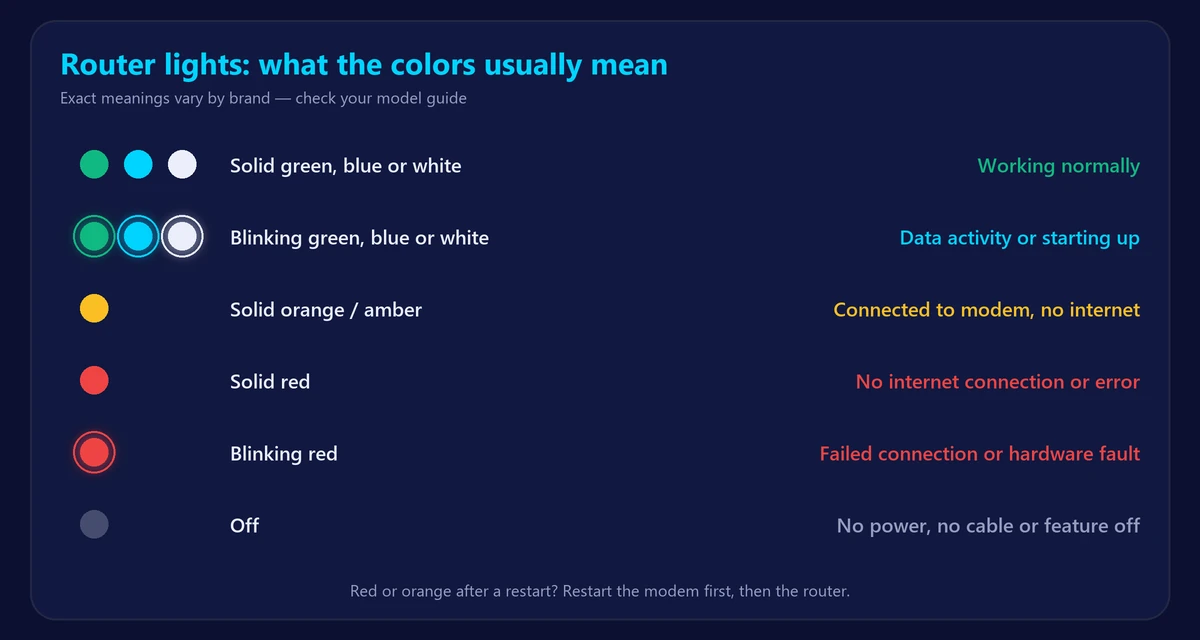
Common router light colors and patterns
Colors vary by brand, but most routers follow similar patterns:
| Light | Usually means | What to do |
|---|---|---|
| Solid green, white or blue | Working normally | Nothing |
| Blinking green, white or blue | Data activity, or starting up / connecting | Wait a few minutes after a restart |
| Solid orange or amber (Internet light) | Connected to the modem but no internet | Restart modem and router, check for an outage |
| Solid red | No internet connection or an error | Check cables, restart both devices |
| Blinking red | Failed connection, firmware problem or hardware fault | Restart; if it persists, reset or contact support |
| Light off | No power, no cable, or that feature is turned off | Check the power adapter and cables |
Brand examples: on many TP-Link routers, an orange Internet LED means the WAN port is connected but the internet isn’t available. On many Netgear routers, an amber Internet LED means the router is connected to the modem but hasn’t received an internet connection. Check the quick-start guide or app for your exact model.
What modem lights mean
Cable modems usually have four main lights:
| Light | Solid | Blinking |
|---|---|---|
| Power | Modem is on | Starting up or a power problem |
| Downstream (DS / ↓) | Receiving the provider’s signal | Searching for a signal |
| Upstream (US / ↑) | Sending to the provider | Trying to connect |
| Online / Internet | Connected to the internet | Registering with the provider |
If DS or US keeps blinking for more than 10–15 minutes, the modem can’t lock onto your provider’s signal. Check the coax cable and splitters, and contact your provider if it continues. Not sure which box is the modem? See modem vs router.
Spectrum router and modem lights
Spectrum equipment is among the most searched. In general, a solid blue or white light on a Spectrum router means it’s working; blinking blue or blue-and-white means it’s starting up or connecting; and red means it can’t reach the internet. A red light usually points to the modem connection, so restart the modem first, wait until its Online light is solid, then restart the router. The Spectrum app also shows outages and lets you restart equipment. We’re not affiliated with Spectrum – check your model’s guide for exact meanings, and test your line with our Spectrum speed test.
How to fix a red or blinking router light
- Restart the modem and router: unplug both for 30 seconds, plug in the modem first, wait 2 minutes, then the router. See how to restart or reset your router.
- Check cables: coax or fiber into the modem, Ethernet from the modem to the router’s Internet/WAN port.
- Check for an outage in your provider’s app or status page.
- Bypass the router: plug a laptop into the modem. If it works, the router is the problem.
- Update or factory reset the router if the light stays red after all of the above.
- Replace aging equipment – frequent red lights and reboots can mean the router is failing. Read how long routers last.
Once the lights are back to normal, run our speed test. If your devices show WiFi but no internet, follow WiFi connected but no internet.
Frequently asked questions
Why is my router blinking red?
Most often the router can’t reach the internet – because of the modem, a cable or a provider outage. If the power light blinks red, it can also be a firmware or hardware fault.
Why is my modem blinking orange?
On many modems, blinking orange or amber means it’s still trying to connect to the provider. Wait a few minutes; if it doesn’t stop, check the cable and contact your provider.
What lights should be on my router?
Normally the Power, Internet/WAN and WiFi lights are solid (often green, white or blue), with Ethernet port lights on for connected cables.
Is a blinking light on my router bad?
Not always. Blinking green or white usually means data is flowing. Only red, orange or constant blinking after a restart signals a problem.