When Spectrum internet slows down or stops working, the first thing support will ask is: “Have you restarted your equipment?” This guide covers every way to do a Spectrum router reset – a quick restart from the app, a manual power cycle of the modem and router, and a full factory reset – plus what the lights mean and what to do if nothing helps.
WiFiTest is independent and not affiliated with Spectrum or Charter Communications. Menu names and button timings can vary by equipment model.
Restart or factory reset?
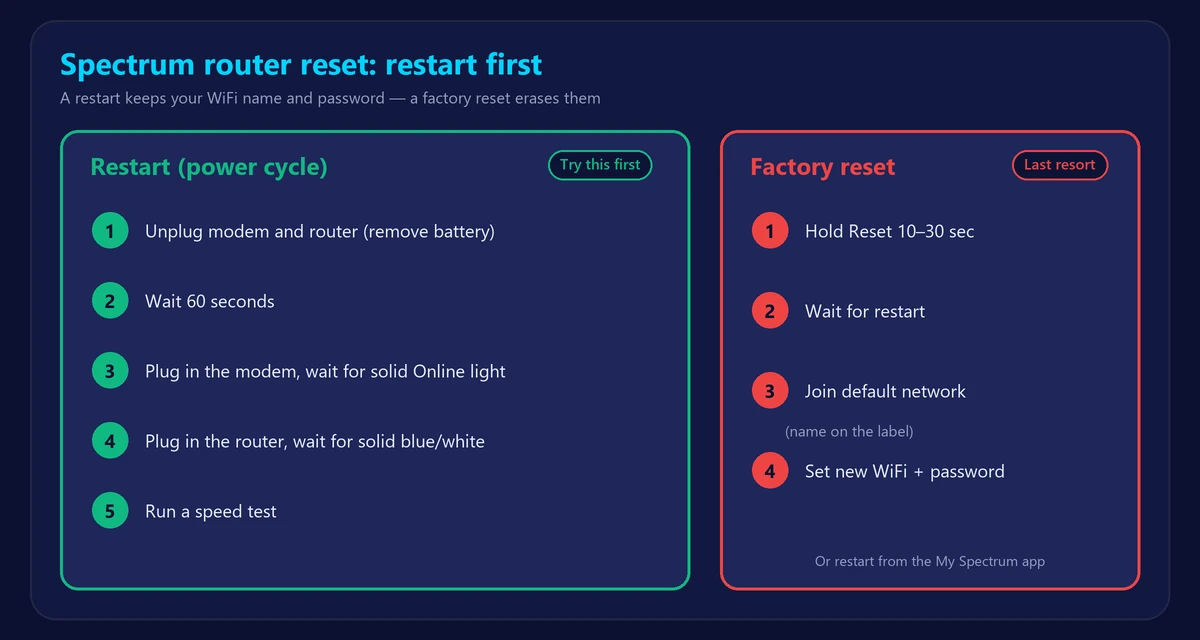
- Restart (reboot / power cycle): turns the equipment off and on. Keeps your WiFi name, password and settings. Fixes most slowdowns and dropouts. Always try this first.
- Factory reset: erases your settings and restores the defaults printed on the label. Use it only if a restart doesn’t help, you forgot the WiFi password, or support tells you to.
Our general guide explains the difference in more detail: how to restart or reset your router.
Method 1: Restart Spectrum equipment from the app
- Open the My Spectrum app and sign in.
- Go to Services (or the Internet section) and select your equipment.
- Choose Restart Equipment or the troubleshooting option, and confirm.
- Wait several minutes until the lights are stable, then test your connection.
You can also do this from your account on Spectrum’s website. The advantage: the app checks for outages in your area at the same time.
Method 2: Manually restart the Spectrum modem and router
- Unplug the power cable from both the modem and the router. If you have a Spectrum voice modem with a backup battery, remove the battery as well.
- Wait at least 60 seconds.
- Plug the modem back in first (and reinsert the battery). Wait about 2–5 minutes until its Online light is solid.
- Plug the router back in and wait another 2 minutes until its light is solid blue or white.
- Run our Spectrum speed test to make sure everything works.
If you have a single Spectrum WiFi gateway instead of two boxes, just unplug that one device for 60 seconds.
Method 3: Factory reset a Spectrum router
Only do this if a restart didn’t help. You will lose your custom WiFi name, password and settings.
- Find the small Reset hole on the back or bottom of the router.
- With the router on, press and hold it with a paper clip for about 10–30 seconds (check your model), until the lights change.
- Wait several minutes for the router to restart.
- Connect using the default network name and password on the router’s label.
- Set a new WiFi name and password in the My Spectrum app or the router settings.
Factory resetting the modem is rarely needed – a power cycle is usually enough. If the modem keeps failing to connect, contact Spectrum.
What Spectrum lights usually mean
| Light | Usually means | What to do |
|---|---|---|
| Solid blue or white | Connected and working | Nothing |
| Blinking blue, or blue and white | Starting up or connecting | Wait a few minutes |
| Red (solid or blinking) | Can’t reach the internet | Restart the modem first, then the router |
| Modem Online light blinking | Registering with Spectrum’s network | Wait; if it never goes solid, check the coax cable and call Spectrum |
For all colors and patterns, see router blinking red: what router and modem lights mean.
Still not working after a reset?
- Check for an outage in the My Spectrum app.
- Check the coax cable from the wall to the modem and any splitters along the way.
- Connect a laptop directly to the modem. If the internet works, the router is the problem – see modem vs router.
- Devices connect but nothing loads? Follow WiFi connected but no internet.
- Old equipment? Spectrum can swap outdated modems and routers – read how long routers last.
Frequently asked questions
How do I restart my Spectrum router?
Use Restart Equipment in the My Spectrum app, or unplug the modem and router for 60 seconds, plug in the modem first, then the router.
How long does a Spectrum router reset take?
A restart takes about 5 minutes for both devices to come back online. A factory reset takes a few more minutes plus time to set up your WiFi again.
Will resetting my Spectrum router change my WiFi password?
A restart won’t. A factory reset restores the default password printed on the router’s label.
Should I restart the modem or the router first?
Turn both off, then start the modem first and wait until it’s online before plugging in the router.